Not every lead is created equal. Some will become loyal customers within weeks, while others will never make it past the first conversation. The challenge for small business owners and sales teams is figuring out which is which — before you spend hours chasing prospects who were never going to buy.
That is where lead scoring comes in. By assigning numerical values to your leads based on who they are and how they interact with your business, you can build a system that surfaces the highest-value opportunities automatically. No more guessing, no more wasted effort.
In this guide, we will break down what lead scoring is, why it matters for small businesses, how to build a practical scoring model, and how to automate the entire process with your CRM.
What Is Lead Scoring?
Lead scoring is a methodology for ranking prospects based on their perceived value to your business. Each lead receives a numerical score — typically on a scale of 0 to 100 — determined by a combination of demographic attributes (who they are) and behavioral signals (what they do).
The concept is straightforward: leads that closely match your ideal customer profile and actively engage with your brand receive higher scores. Leads that are a poor fit or show minimal interest receive lower scores. Your sales team then prioritizes outreach based on these rankings.
Think of it as a filter. Instead of treating every new contact the same, lead scoring helps you separate the ready-to-buy prospects from the just-browsing visitors. That distinction can dramatically improve how efficiently your team allocates its time.
If you are still refining how leads enter your pipeline in the first place, our guide on lead capture tools and their role in CRM covers the foundational step that comes before scoring.
Why Lead Scoring Matters for Small Businesses
Large enterprises have entire teams dedicated to qualifying leads. Small businesses do not have that luxury. When your sales team is two or three people — or just you — every hour counts.
Here is what effective lead scoring delivers:
Higher Conversion Rates
When your team focuses on leads that are already a strong fit and showing buying signals, close rates go up. Research consistently shows that companies using lead scoring see measurable improvements in conversion rates because reps spend their energy on prospects who are genuinely interested.
Shorter Sales Cycles
Leads with high scores are typically further along in their buying journey. Reaching out to them at the right moment — rather than nurturing cold leads for weeks — compresses the time from first contact to closed deal. For more on managing this process effectively, see our post on CRM and sales pipeline management.
Better Sales and Marketing Alignment
Lead scoring creates a shared definition of what a “qualified lead” actually means. Marketing knows exactly what criteria a lead must meet before passing it to sales, and sales trusts that the leads they receive are worth pursuing. That alignment eliminates the common friction between the two teams.
Smarter Resource Allocation
Instead of spreading your team thin across every inbound inquiry, scoring lets you invest disproportionately in the leads most likely to generate revenue. For a small business, that focus is the difference between steady growth and spinning your wheels.
Building a Lead Scoring Model
A practical scoring model combines two types of criteria: demographic scoring (fit-based) and behavioral scoring (interest-based). Together, they paint a complete picture of each lead’s potential.
Demographic Scoring: Who Is This Lead?
Demographic criteria evaluate whether a lead matches your ideal customer profile (ICP). These are static attributes — facts about the person or their company that do not change based on interaction with your content.
Common demographic factors include:
- Job title or role — Decision-makers score higher than individual contributors
- Company size — Businesses within your target range score higher
- Industry — Leads in industries you serve well get a boost
- Geographic location — Local or in-territory leads may score higher
- Budget indicators — Leads who self-report budget ranges that match your pricing
You can also apply negative scoring to disqualify poor fits. A student researching for a class project, a competitor browsing your site, or a lead from an industry you do not serve should lose points rather than gain them.
Behavioral Scoring: What Are They Doing?
Behavioral criteria measure a lead’s level of engagement and intent. These signals change over time and often indicate where a prospect sits in their buying journey.
Key behavioral signals include:
- Website visits — Especially visits to pricing, demo, or product pages
- Email engagement — Opens, clicks, and replies to your outreach
- Content downloads — Whitepapers, guides, or case studies
- Form submissions — Demo requests, contact forms, newsletter signups
- Social engagement — Interactions with your brand on social platforms
- Event attendance — Webinars, live demos, or in-person events
High-intent actions like visiting your pricing page or requesting a demo should carry significantly more weight than passive actions like opening an email. The goal is to identify leads who are actively evaluating a solution — not just casually consuming content.
For strategies on generating these engaged leads in the first place, check out our guide on lead acquisition marketing strategies.
Example Scoring Model
Here is a practical scoring table you can adapt for your own business. This example uses a 100-point scale where leads scoring 70 or above are considered sales-ready.
| Action / Attribute | Points | Rationale |
|---|---|---|
| Job title is decision-maker (Owner, VP, Director) | +15 | Direct authority to purchase |
| Company size matches ICP (10-200 employees) | +10 | Falls within target market |
| Industry is a strong fit | +10 | Higher likelihood of product-market fit |
| Located in target geography | +5 | Easier to serve and support |
| Visited pricing page | +20 | Strong buying intent signal |
| Requested a demo | +25 | Highest intent action |
| Downloaded a guide or resource | +10 | Active research phase |
| Opened 3+ emails in 30 days | +10 | Sustained engagement |
| Clicked a link in an email | +5 | Moderate engagement signal |
| Submitted a contact form | +15 | Direct outreach intent |
| Attended a webinar | +10 | Invested time in learning about solution |
| No engagement in 30+ days | -15 | Interest has likely faded |
| Competitor email domain | -30 | Not a genuine prospect |
| Unsubscribed from emails | -20 | Opted out of communication |
Scoring thresholds:
- 0-29 points: Cold lead — continue nurturing with automated email sequences
- 30-69 points: Warm lead — monitor for additional engagement; consider targeted outreach
- 70-100 points: Hot lead — prioritize for immediate sales follow-up
Adjust these values based on your actual data. After running your model for a few months, review which scored leads actually converted and refine the point values accordingly.
Common Lead Scoring Mistakes
Even a well-intentioned scoring model can go wrong. Watch out for these pitfalls:
Overcomplicating the Model
It is tempting to score every possible data point, but complexity creates confusion. Start with 8 to 12 criteria that your team agrees on, then iterate. A simple model that your team actually uses beats a sophisticated one that nobody trusts.
Ignoring Negative Scoring
If you only add points and never subtract them, every lead eventually looks qualified. Negative scoring for disqualifying attributes — like competitor domains, unsubscribes, or prolonged inactivity — keeps your scores honest.
Setting It and Forgetting It
A scoring model is not a one-time project. Your ideal customer profile evolves, market conditions shift, and buyer behavior changes. Review your model quarterly. Compare scored leads against actual closed deals and adjust weights that are not predicting outcomes accurately.
Relying on Demographics Alone
A lead can match your ICP perfectly on paper and still have zero interest in buying. Behavioral signals are what distinguish a good fit who is ready to act from a good fit who is just browsing. Always combine both dimensions.
Not Defining Score Thresholds Clearly
If your sales team does not know what score triggers action, the model is theoretical. Define explicit thresholds — cold, warm, hot — and tie them to specific workflows. A lead hitting 70 should trigger a task or notification, not just sit in a report.
Automating Lead Scoring with Your CRM
Manual lead scoring is possible when you have a handful of leads per week. Once volume grows, it becomes unsustainable. That is where CRM automation transforms lead scoring from a theory into an operational advantage.
A modern CRM can automatically:
- Assign points in real time as leads take actions (page visits, form fills, email clicks)
- Update scores dynamically as new data comes in or engagement drops off
- Trigger workflows when leads cross score thresholds — like assigning a task to a rep or moving a deal to a new pipeline stage
- Decay scores over time so stale leads do not clog your hot list
- Surface dashboards that show your team exactly which leads need attention right now
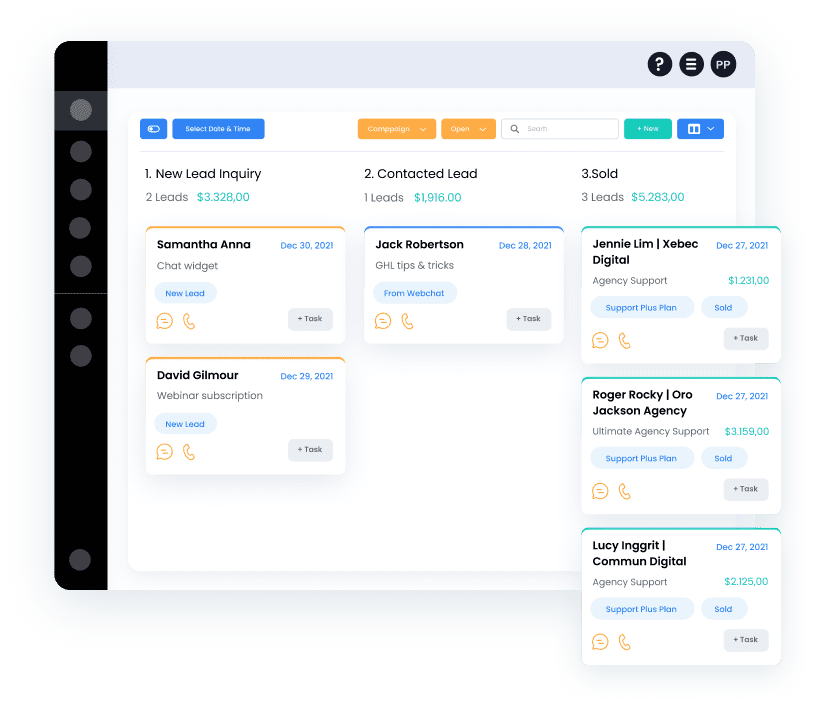
The real power comes from connecting scoring to your broader automation workflows. When a lead hits your hot threshold, your CRM can automatically notify the assigned rep, create a follow-up task, and log the lead’s full engagement history so the rep walks into the conversation fully prepared. For a deeper look at what workflow automation can do, read our guide on CRM with workflow automation.
How SMBcrm Supports Lead Scoring
SMBcrm provides the building blocks to implement lead scoring without needing a separate tool. With built-in contact tracking, pipeline management, and workflow automation, you can set up scoring rules that assign point values based on contact attributes and engagement actions. When a lead crosses your defined threshold, automated workflows handle the next step — whether that is moving the contact to a new pipeline stage, assigning a task to a team member, or triggering a personalized email sequence.
Because everything lives in one platform — contacts, emails, pipelines, and automations — there is no need to stitch together multiple tools or worry about data syncing between systems.
Frequently Asked Questions
How many leads do I need before lead scoring is worthwhile?
There is no hard minimum, but lead scoring typically becomes valuable once you are receiving more leads than your team can individually evaluate. For most small businesses, that inflection point is somewhere around 50 to 100 new leads per month. Below that volume, manual prioritization may still work. Above it, scoring prevents good leads from slipping through the cracks.
Should I score every lead the same way regardless of product or service?
Not necessarily. If you offer multiple products or services with different buyer profiles, consider building separate scoring models — or at least adjusting demographic weights — for each. A lead who is a perfect fit for your entry-level service may not be the right fit for your premium offering, and a single model may not capture that distinction.
How often should I update my scoring model?
Plan to review your model at least once per quarter. Compare your highest-scored leads against actual conversion data. If leads scoring 80+ are not converting at a meaningfully higher rate than leads scoring 50, your weights need adjustment. Treat the model as a living system, not a static ruleset.
What is the difference between lead scoring and lead grading?
Lead grading evaluates how well a lead matches your ideal customer profile — it is purely demographic. Lead scoring combines that demographic fit with behavioral engagement data. Most effective systems use both dimensions together, which is the approach outlined in this guide. Grading tells you if a lead could be a good customer; scoring tells you if they are likely to become one soon.
Putting It All Together
Lead scoring does not have to be complicated to be effective. Start with a clear picture of your ideal customer, identify the actions that signal genuine buying intent, and assign point values that reflect those priorities. Automate the process through your CRM so scores update in real time and your team always knows where to focus.
The businesses that grow efficiently are not the ones chasing every lead — they are the ones chasing the right leads. A well-built scoring model is how you tell the difference.
Ready to Start Scoring Your Leads?
SMBcrm gives you the contact tracking, pipeline management, and workflow automation you need to build and run a lead scoring system — all in one platform.