Small business automation is the practice of using software to handle repetitive tasks without manual intervention. Instead of remembering to send follow-up emails, chase unpaid invoices, or confirm tomorrow’s appointments, the right automations handle these actions on a schedule or in response to specific triggers.
The payoff is significant. Small business owners and their teams routinely spend 10 to 20 hours per week on tasks that could be fully automated. That is an entire part-time employee’s worth of labor going toward work that software handles more reliably and more consistently than any human can.
This guide covers seven specific workflows that deliver the highest return on time investment. Each one includes the trigger that starts it, the actions it performs, and the results you should expect. If you are new to workflow automation concepts, our CRM workflow automation guide covers the fundamentals in detail.
Why Automation Matters for Small Businesses
Small business teams operate under constant pressure to do more with less. The founder who closes deals also handles customer support. The office manager who schedules appointments also sends invoices. When every person fills multiple roles, manual processes become bottlenecks that limit growth.
Automation addresses this by removing the tasks that do not require human judgment. Consider the math: if your team spends 15 minutes manually following up with each new lead and you receive 10 leads per day, that is 12.5 hours per week spent on a task that an automated workflow handles in seconds.
Beyond time savings, automation delivers three advantages that manual processes cannot match:
- Speed: Automated responses reach leads within minutes, not hours. Research consistently shows that responding within five minutes dramatically increases conversion rates.
- Consistency: Every customer receives the same professional experience regardless of how busy your team is on a given day.
- Reliability: Automated workflows never forget a follow-up, miss an appointment reminder, or let an invoice go unsent.
The seven workflows below represent the highest-impact automations for small businesses. Most can be set up in under 30 minutes and begin saving time immediately.
The 7 Workflows Every Small Business Should Automate
1. New Lead Instant Follow-Up
Speed matters more than almost any other factor in lead conversion. A study published by Harvard Business Review found that businesses responding to leads within five minutes were 100 times more likely to make contact than those waiting 30 minutes. Yet the average small business response time is measured in hours, not minutes.
Trigger: A new lead submits a contact form, requests a quote, or fills out any lead capture form on your website.
Actions:
- Immediately (within 1 minute): Send a personalized email acknowledging their inquiry and setting expectations for next steps.
- Within 5 minutes: Send an SMS message introducing yourself and asking if they have a quick question you can answer right away.
- After 1 hour: If no reply, create an internal task for a team member to make a personal phone call.
- After 24 hours: If still no reply, send a follow-up email with a relevant case study or resource.
Expected result: Response times drop from hours to under five minutes. Lead-to-appointment conversion rates typically increase by 30 to 50 percent. For a deeper look at follow-up timing and sequences, see our sales follow-up strategy guide.
2. Appointment Reminders and Confirmations
Missed appointments cost small businesses thousands of dollars per year. Service-based businesses report no-show rates between 10 and 30 percent when relying on a single confirmation at booking time. A structured reminder sequence cuts that rate dramatically.
Trigger: An appointment is booked through your online scheduling calendar.
Actions:
- Immediately: Send a confirmation email with date, time, location (or video link), and calendar invite attachment.
- 24 hours before: Send an SMS reminder with a one-tap confirm or reschedule option.
- 2 hours before: Send a final SMS reminder with directions or preparation instructions.
- After appointment: Trigger post-appointment follow-up (see workflows 3 and 4 below).
Expected result: No-show rates drop by 50 to 80 percent. Staff spend zero time making reminder calls. Customers appreciate the professional experience and the easy option to reschedule rather than simply not showing up.
3. Post-Purchase Review Requests
Online reviews directly influence whether new customers choose your business. The challenge is timing: ask too early and the customer has not experienced your product yet. Ask too late and the positive feeling has faded. Automation solves this by sending the request at exactly the right moment.
Trigger: A purchase is completed, a service is delivered, or an appointment is marked as attended.
Actions:
- After 24-48 hours: Send a personalized email thanking the customer and asking about their experience.
- Include a direct link: Point to your Google Business Profile review page to minimize friction.
- After 5 days: If no review is submitted, send a gentle SMS follow-up with the same link.
- Conditional routing: If the customer responds with negative feedback, route to a team member for personal follow-up rather than directing them to a public review site.
Expected result: Review volume increases by two to five times. Negative experiences get caught privately before becoming public complaints. Your Google star rating improves as more satisfied customers leave feedback. For a complete strategy, read our online reputation management guide.
4. Invoice and Payment Reminders
Chasing unpaid invoices is one of the most time-consuming and uncomfortable tasks in small business operations. Automation removes the awkwardness entirely by making reminders feel like standard business process rather than personal requests.
Trigger: An invoice is created or a payment due date approaches.
Actions:
- On invoice creation: Send the invoice via email with a clear payment link and due date.
- 3 days before due date: Send a friendly reminder that payment is coming due.
- On due date: Send a notification that payment is due today.
- 3 days past due: Send a firmer reminder noting the overdue status and any applicable late fee policy.
- 7 days past due: Create an internal task for a team member to make personal contact.
Expected result: Average days-to-payment decreases significantly. Staff spend zero time on routine payment reminders. Cash flow becomes more predictable. For more on streamlining your billing process, see our guide on small business invoice software.
5. Birthday and Anniversary Campaigns
Personalized outreach on meaningful dates builds loyalty and drives repeat business with minimal effort. Birthday and anniversary emails consistently outperform standard marketing messages, with open rates often exceeding 45 percent.
Trigger: A contact’s birthday or customer anniversary date arrives (stored as a custom field in your CRM).
Actions:
- On the date: Send a personalized email with a birthday or anniversary greeting.
- Include a special offer: Attach a discount code, free upgrade, or exclusive perk valid for a limited window (typically 7 to 14 days).
- After 3 days: If the offer has not been redeemed, send a reminder SMS noting the expiration.
- On redemption: Tag the contact for reporting and trigger any fulfillment steps.
Expected result: Customer lifetime value increases through repeat purchases. Redemption rates on birthday offers typically range from 15 to 30 percent, far above standard promotional campaigns. The automated nature means this runs year-round with no manual effort after initial setup.
6. Re-Engagement Campaigns for Cold Leads
Every business accumulates cold leads: contacts who showed initial interest but never converted. Rather than letting these leads sit unused in your CRM, automated re-engagement campaigns periodically test whether their circumstances have changed.
Trigger: A contact has not opened an email, visited your website, or taken any recorded action in 60 to 90 days.
Actions:
- Day 1: Send a “checking in” email acknowledging the gap and offering something new (updated pricing, new feature, seasonal offer).
- Day 4: If opened but no reply, send a follow-up with a different angle (case study, testimonial, or educational content).
- Day 10: Send a final email with a direct question: “Still interested, or should we stop reaching out?”
- On reply: Route to a team member for personal follow-up and update the contact’s status.
- No response after 14 days: Mark the contact as inactive and remove from active marketing sequences to protect your sender reputation.
Expected result: Between 5 and 15 percent of cold leads re-engage, generating revenue from contacts that would otherwise be forgotten. Your contact list stays clean, which improves email deliverability across all campaigns.
7. Internal Task Assignment and Notifications
Not all automation is customer-facing. Internal workflow automation ensures that the right team member is notified and assigned work when specific events occur, eliminating the need for managers to manually delegate tasks.
Trigger: Various internal events such as a deal reaching a specific pipeline stage, a support ticket being created, a high-value lead entering the system, or a contract approaching its renewal date.
Actions:
- On trigger: Automatically create a task assigned to the appropriate team member based on predefined rules (territory, expertise, availability).
- Immediately: Send an in-app or email notification to the assignee with full context.
- If unacknowledged after 2 hours: Escalate to a manager or reassign to another team member.
- On completion: Update the relevant CRM record and notify any stakeholders.
Expected result: Tasks are assigned instantly instead of waiting for a morning meeting or email chain. Nothing falls through the cracks during busy periods. Managers gain visibility into workload distribution without micromanaging. Response times to customer needs improve because the right person is alerted immediately.
Time Savings Summary
The table below shows the estimated weekly time savings for each workflow, assuming a small business handling moderate volume.
| Workflow | Trigger | Primary Channel | Est. Time Saved/Week |
|---|---|---|---|
| New lead follow-up | Form submission | Email + SMS | 3-5 hours |
| Appointment reminders | Booking created | SMS + Email | 2-3 hours |
| Review requests | Service completed | Email + SMS | 1-2 hours |
| Invoice reminders | Invoice created / due date | 2-4 hours | |
| Birthday campaigns | Date field match | Email + SMS | 1 hour |
| Re-engagement campaigns | Inactivity period | 1-2 hours | |
| Internal task assignment | Pipeline/event triggers | In-app + Email | 2-3 hours |
| Total | 12-20 hours |
These are conservative estimates. Businesses with higher lead volume or larger customer bases see proportionally greater savings.
Setting Up Automations in SMBcrm
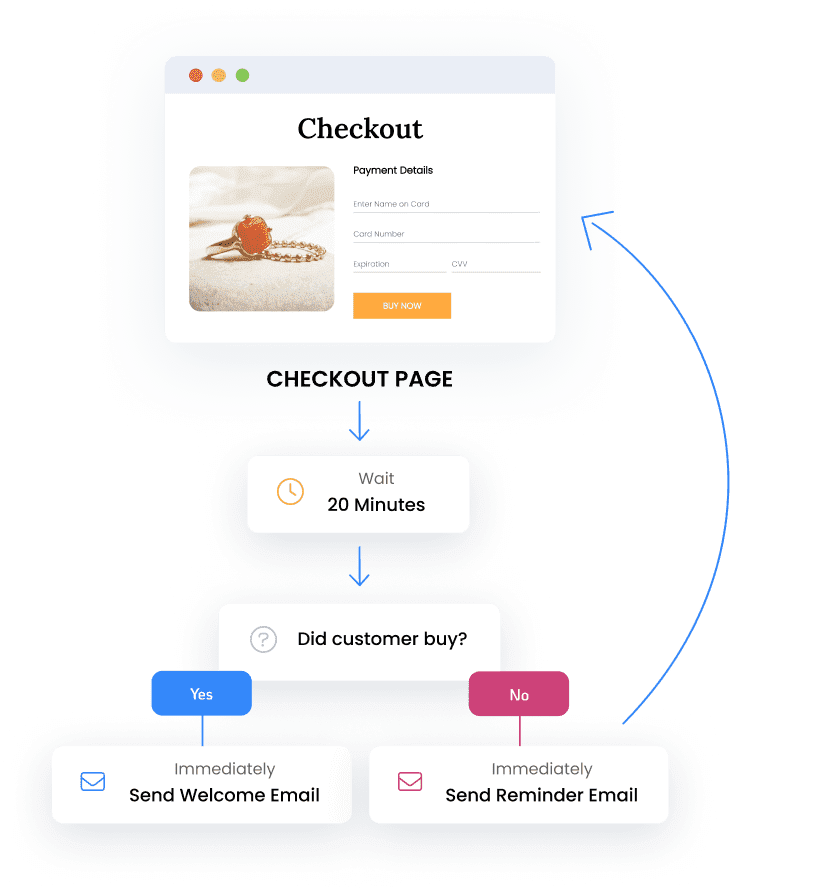
Building these workflows does not require technical expertise. SMBcrm’s visual workflow builder uses a drag-and-drop interface where you select triggers, define conditions, and add actions in a logical sequence. Each workflow is displayed as a visual flowchart, making it easy to understand the logic at a glance and modify it as your business evolves.
Key capabilities that make setup straightforward:
- Pre-built templates for the most common workflows, including all seven described in this guide
- Multi-channel actions combining email, SMS, task creation, and pipeline updates within a single workflow
- Conditional branching so workflows adapt based on customer behavior (opened email, clicked link, replied, etc.)
- Time-based delays with flexible scheduling (minutes, hours, days, or specific times of day)
- Testing mode to preview workflow behavior before activating it with real contacts
Most businesses start with one or two workflows, measure the results over a couple of weeks, and then expand from there. The compounding effect of multiple automations running simultaneously is where the real transformation happens.
Frequently Asked Questions
How much does it cost to set up these automations?
Most modern CRM platforms include workflow automation in their standard plans. SMBcrm includes full automation capabilities at every pricing tier. The primary investment is time: plan on 15 to 30 minutes per workflow for initial setup, plus occasional adjustments as you refine your messaging and timing.
Will automated messages feel impersonal to my customers?
Not when done correctly. Use personalization fields (first name, company, recent purchase) in every message. Write in a conversational tone that matches how your team actually communicates. The key is that automation handles the timing and delivery while the content still sounds human. Most customers cannot distinguish well-written automated messages from manually sent ones.
What if I only have a few leads per week? Is automation still worth it?
Yes. Even with low volume, automation ensures that every lead receives a timely, professional response regardless of when they come in. A lead that arrives at 11 PM on a Saturday receives the same instant follow-up as one that arrives at 10 am on a Tuesday. Automation also establishes processes that scale seamlessly as your business grows.
How do I measure whether my automations are working?
Track three core metrics for each workflow: completion rate (what percentage of contacts complete the full sequence), response rate (what percentage take the desired action), and time saved (compare hours spent before and after automation). Review these monthly and adjust messaging, timing, or channel selection based on what the data shows.
Ready to Automate Your Business?
These seven workflows can reclaim 12 to 20 hours per week for your team, and SMBcrm’s visual workflow builder makes setup simple with pre-built templates and drag-and-drop configuration.