Skip to content

Explore SMBcrm

From a missed call
to a booked visit.

Follow one inquiry through the CRM. See what happens automatically, where your team steps in, and how the tools connect.

Already comparing plans? See pricing

01 / Phone & automation

A missed call starts a conversation

Dana calls about a kitchen remodel while your team is on a job. A configured missed-call text-back sends your saved message, giving Dana a way to reply.

Your team’s role

You write the first message and decide which phone number and missed-call conditions should start the follow-up.

Before you switch it on

Check message permissions, business hours and repeat-call behavior before turning it on. A missed call does not guarantee a text can be delivered.

One inquiry in SMBcrmIllustrative example
Dana OrtizKitchen remodel inquiry
Inquiry received
Missed incoming callYour team is on a job
Saved text-back message

Thanks for calling. We missed you while on a job. What can we help with?

Dana replies

I’m looking for a quote on a kitchen remodel.

A saved message can start this workflow without AI.

See the SMBcrm phone & automation workspace
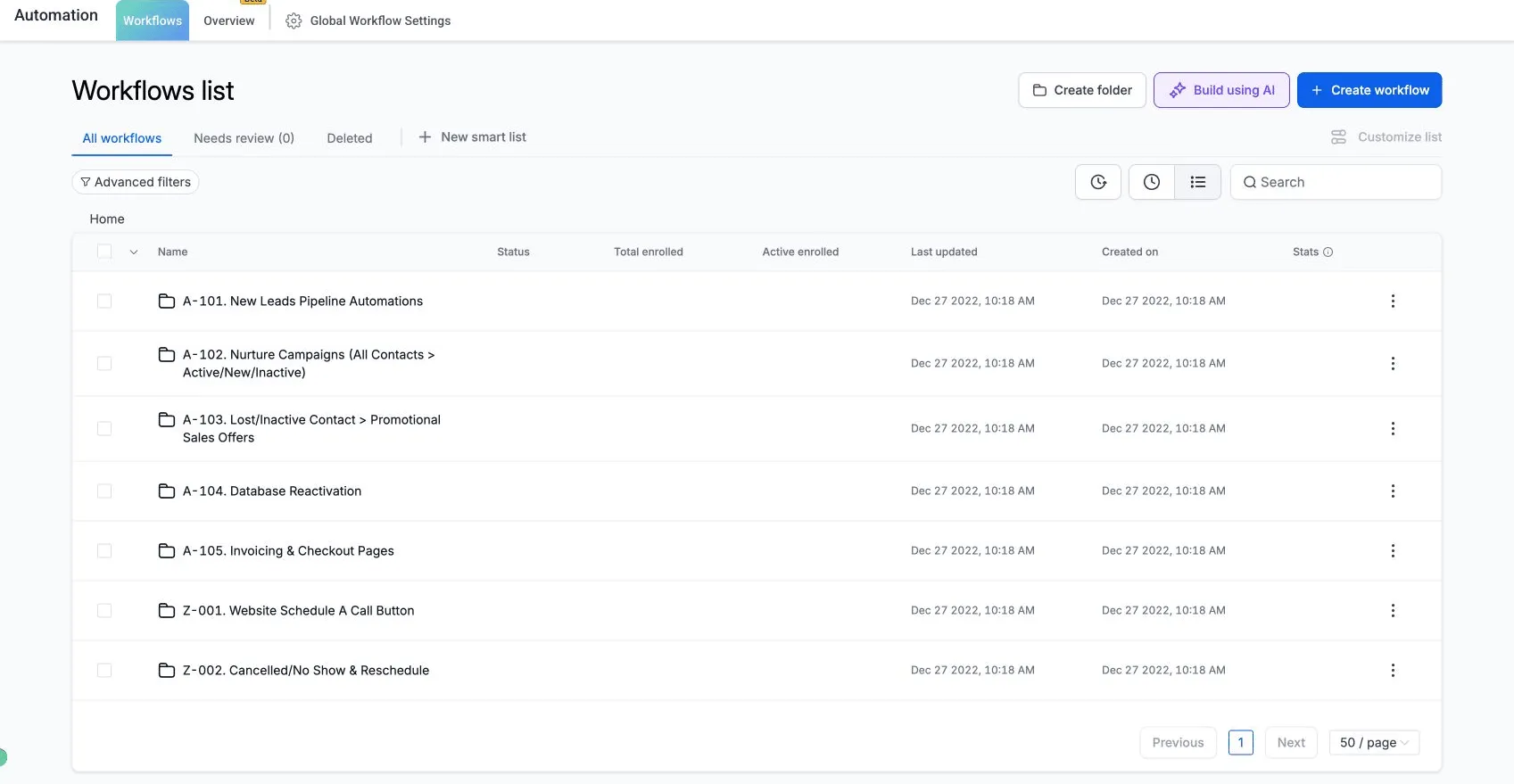
SMBcrm Automation workspace showing the workflows list and Create workflow control
Automation is where you organize the follow-up workflows your team configures. These existing product screenshots use different demo records from Dana’s illustrative journey.

02 / Conversations

Your team gets the context with the reply

Dana replies with the kind of work they need. Your team can read the conversation in the shared inbox, check the contact history and respond from the same place.

Your team’s role

A team member checks the request and sends the right booking link. Questions about scope, estimates or exceptions stay with a person.

Before you switch it on

Configure follow-up to stop when a contact responds, and test that behavior. Assign a person to handle replies so an inquiry has a clear owner.

One inquiry in SMBcrmIllustrative example
Dana OrtizKitchen remodel inquiry
Staff follow-up
Dana’s inquiry

I’m looking for a quote on a kitchen remodel.

Assigned toYour teamReview the request
Staff reply

We can arrange an estimate visit. Here’s our booking link so you can choose a time.

The person handling the conversation can see what was already said.

Optional AI help Answer a routine question before staff takes over

A narrow job for Conversation AI

If Dana asks which areas you serve, Conversation AI can answer from the business information you provide. Your team still handles project scope, estimates and exceptions.

Set the boundary first

Choose its knowledge, test the answers and configure when to hand the conversation to a person. The core workflow above can run without AI.

AI costs depend on your CRM plan and AI coverage. Enterprise includes AI Employee Unlimited; other plans can add coverage or use metered AI. Phone and message delivery can add charges.

Explore Conversation AI →Understand usage and AI coverage →
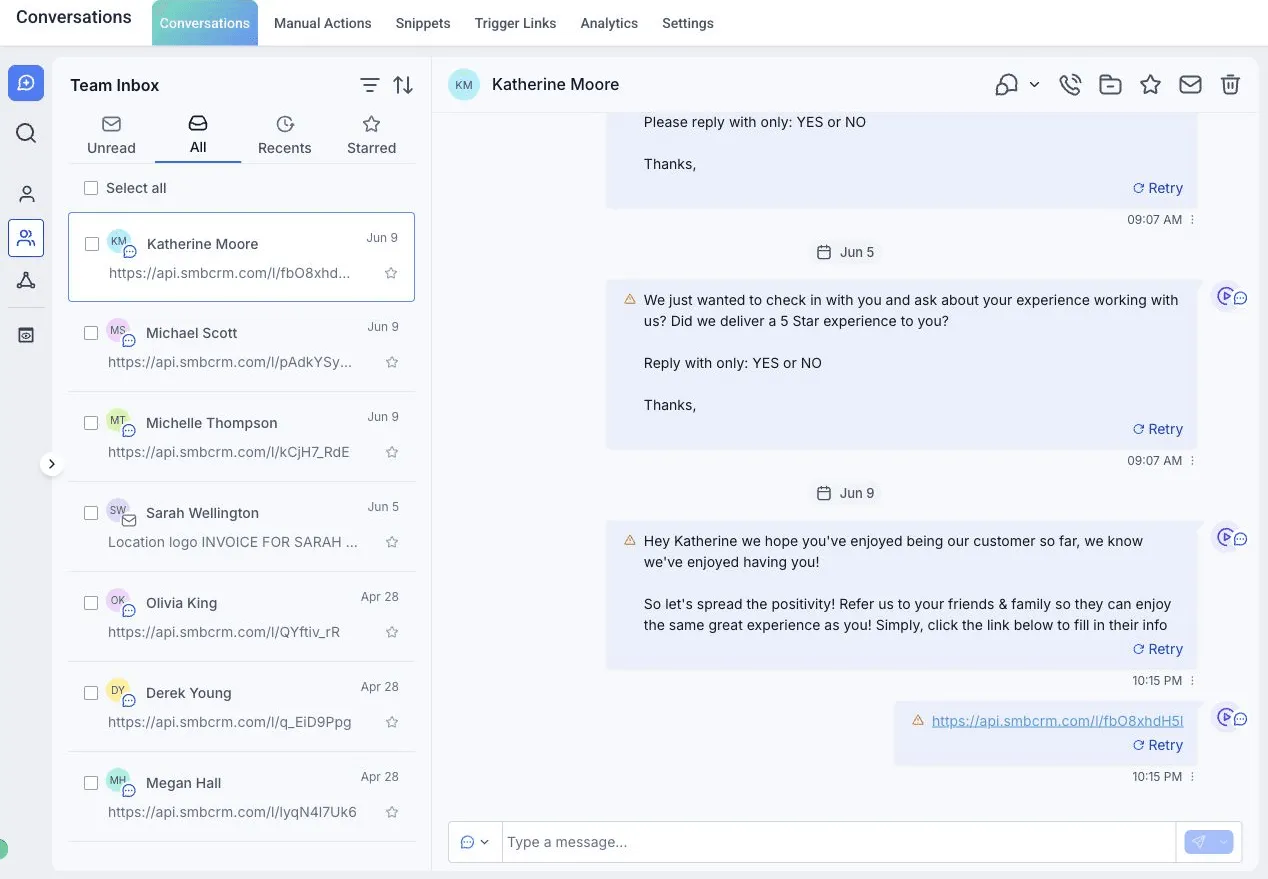
See the SMBcrm conversations workspace
SMBcrm shared inbox showing a conversation, message history and delivery status
The shared inbox puts message history, delivery status and reply controls beside the contact. These existing product screenshots use different demo records from Dana’s illustrative journey.

03 / Calendars

The conversation has a clear next step

Dana follows the booking link and chooses an available time for an estimate visit. Your team can see the appointment in its calendar.

Your team’s role

Set the appointment type, availability and connected calendar. Add confirmations and reminders that match how your business works.

Before you switch it on

Test a booking, cancellation and reschedule. Check that reminders follow the new appointment time and that staff know who is attending.

One inquiry in SMBcrmIllustrative example
Dana OrtizKitchen remodel inquiry
Estimate visit booked
Estimate visitThursday · 10:00 AM

Dana Ortiz · Kitchen remodel

Example booking confirmed
  1. Confirmation follows your settings
  2. Reminder follows your schedule
  3. Staff reviews the visit details

This is an example appointment, not live availability.

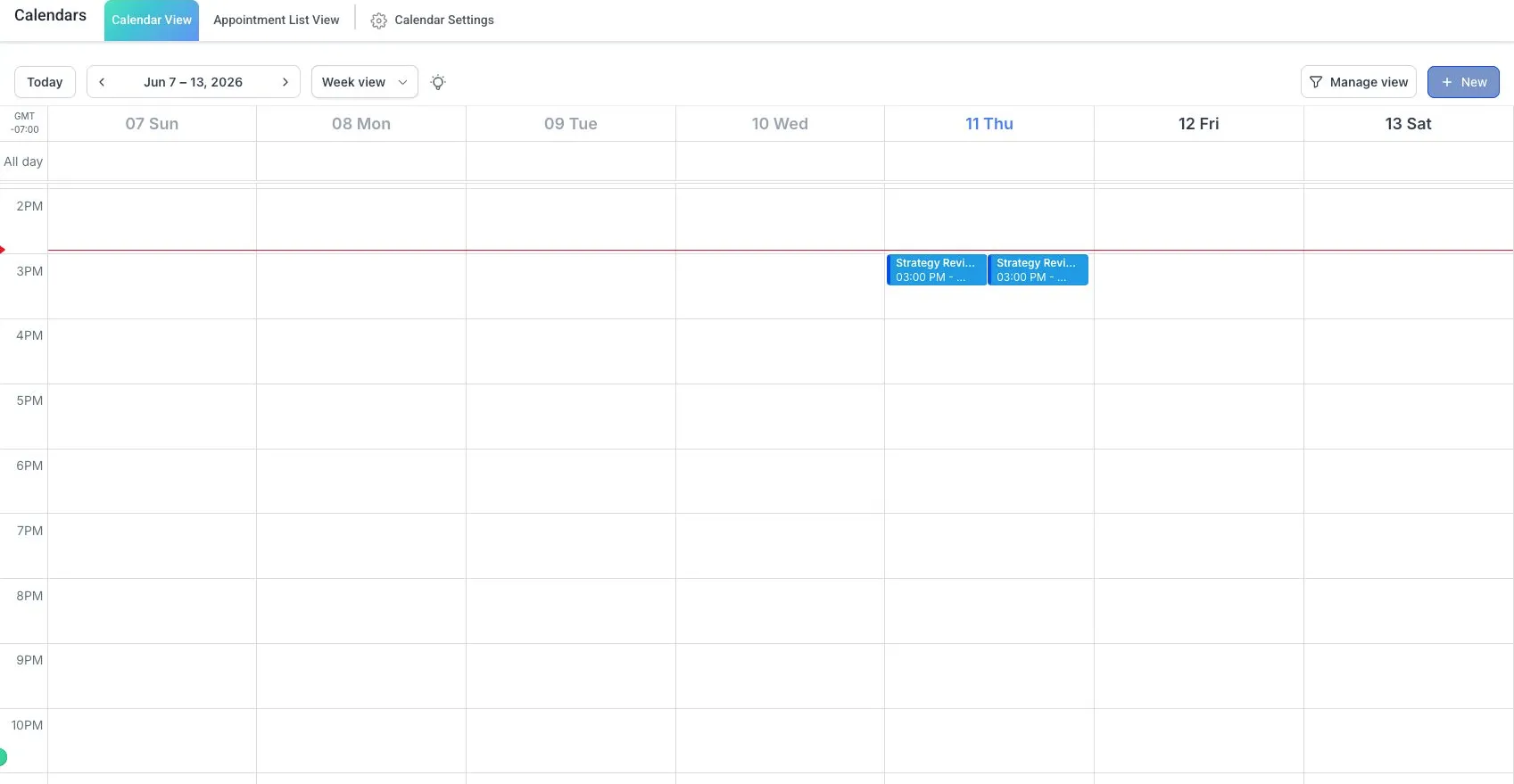
See the SMBcrm calendars workspace
SMBcrm weekly calendar and appointment entries
Calendar view gives your team a place to review scheduled appointments. These existing product screenshots use different demo records from Dana’s illustrative journey.

04 / Opportunities

A booked visit stays visible in the pipeline

Dana’s inquiry now has a next step: the estimate visit. A team member or a configured workflow updates the opportunity so the team can follow it through the sales process.

Your team’s role

Choose stages your team uses, assign the opportunity and keep the next follow-up visible. A booking is progress, not a completed sale.

Before you switch it on

Keep dispatch, job costing and specialist operations in the systems you need. Confirm integrations and ownership before connecting the workflow.

One inquiry in SMBcrmIllustrative example
Dana OrtizKitchen remodel inquiry
Next action: prepare estimate
New inquiryVisit bookedEstimate sent
Kitchen remodel · Dana Ortiz

Prepare for the estimate visit

Owner
Your team
Stage
Visit booked
Next action
Review project details

Stage names and automatic updates depend on your configuration.

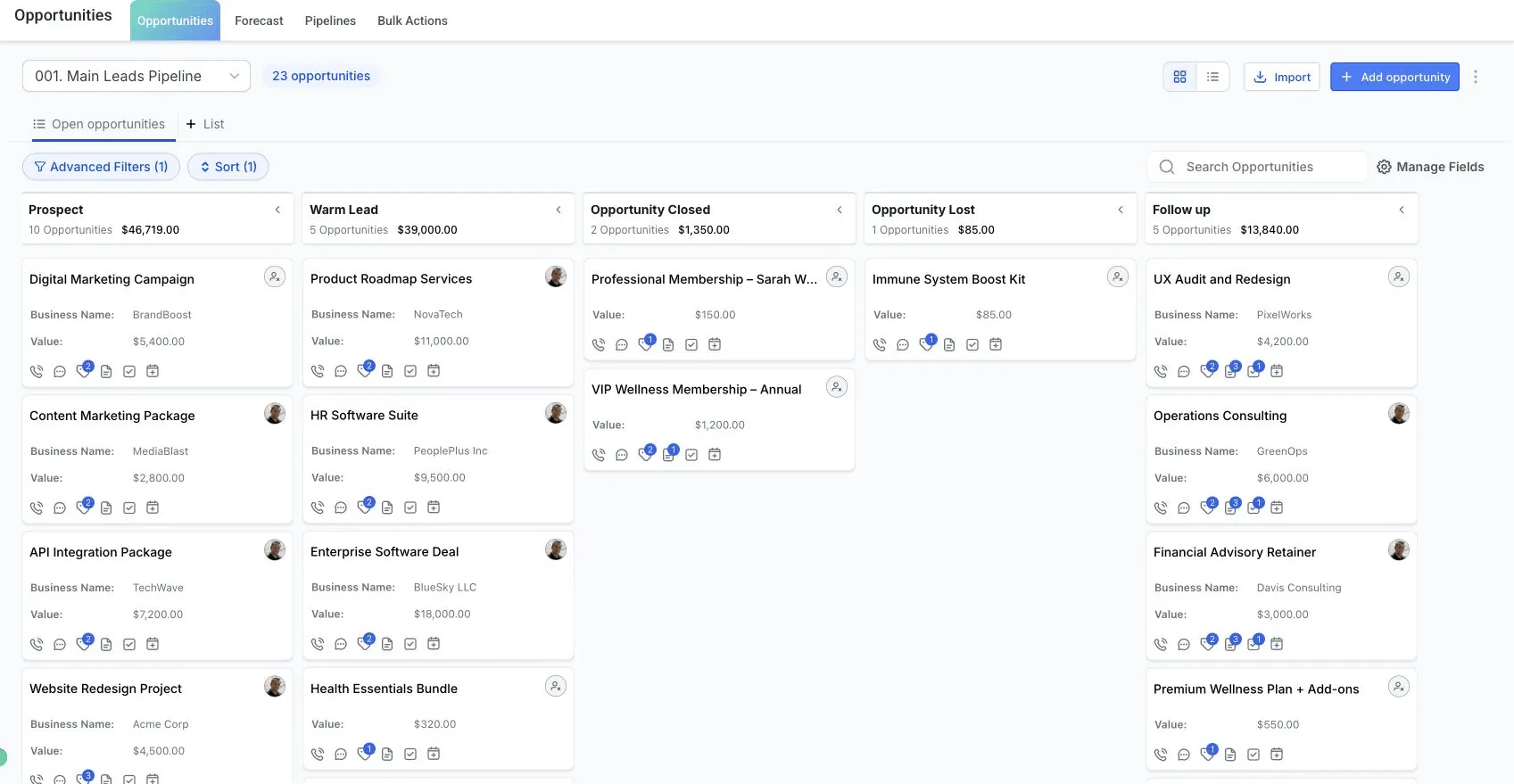
See the SMBcrm opportunities workspace
SMBcrm opportunities board with pipeline stages and cards for individual opportunities
The pipeline groups opportunities by the stages you define for your business. These existing product screenshots use different demo records from Dana’s illustrative journey.

Make it work for your business

Start with one working flow.

Bring your phone setup, appointment rules and follow-up process. Decide who owns each handoff before adding more automation.

01

Connect the essentials

Set up your business number, messaging permissions and calendar. Choose the inbox and pipeline your team will use.

02

Test the whole path

Check a missed call, a reply, a booking and a cancellation. Review message timing, delivery and the person responsible for the next step.

03

Add AI when it helps

Start with a defined question or task. Review its answers, handoff rules and usage before expanding what it can do.

See the plan. Understand the setup.

Your total depends on the CRM plan, phone and messaging usage, and any optional AI coverage. Group training and support are included; guided one-on-one setup depends on your plan.

Compare onboarding and setup support →
See plans and pricingSchedule a live demo

For a live demo, bring the workflow you want to set up.

Explore this in your industry: HVACRoofingHome services