Automate Everything
Build powerful automations with visual workflows, conditional logic, webhooks, and custom code — even trigger actions from e-commerce events.
- Visual drag-and-drop workflow builder
- Smart triggers and conditions
- Webhook and API integrations
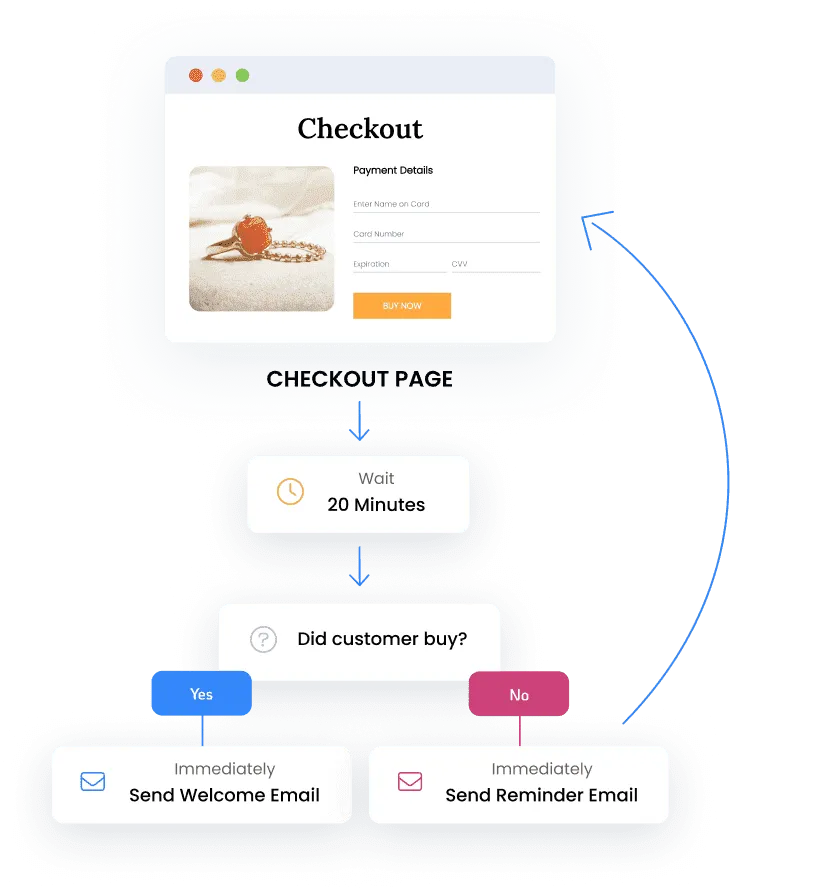
- Post-purchase automation
Your Business on Autopilot
Build workflows that handle repetitive tasks automatically so your team can focus on strategy.
- Visual drag-and-drop builder
- Smart triggers and conditions
- Pre-built workflow templates
Active Workflows
47
Next Action
Wait step
Tasks Automated
1,893
Sample metrics shown in the cards.
Explore the tools
Choose a tool to see details or how it fits into a workflow. Availability and usage charges vary by plan and feature.
How automation works
-
Trigger
Start workflows from any event — a new lead, a booking, a payment, a reply, a tag change.
-
Build
Drag-and-drop multi-step logic with conditions, delays, and branches — no code required.
-
Scale
Let automations handle follow-up, reminders, and handoffs while your team focuses on closing.
Keep exploring
Guides and updates for this workflow
See setup ideas and specific product changes before choosing your next step.
Frequently Asked Questions
Do I need coding skills to build automations?
What can I automate with SMBcrm?
How many automations can I create?
Can automations trigger based on customer behavior?
Does SMBcrm support webhook and API integrations?
Continue this workflow
Ready to put Automation to work?
Replace a dozen point tools with one platform built to capture leads, automate follow-up, and grow revenue.
-
60-day money-back guarantee
Eligible Startup and Professional initial subscription fees only. Usage and add-ons are excluded. Read the refund terms.
-
No setup fees
Plan your setup with training and support
-
Cancel anytime
No long-term contracts, stay because you want to