AI that answers, works, and builds inside your CRM
Let AI reply to customers on chat and phone, hand routine CRM tasks to an agent, and build pages, apps, and copy from a description. Use one piece or all of it. Your contacts, calendars, and follow-up stay where they are.
Some AI is included on every plan. The rest is pay-per-use or covered by one add-on. See how AI is billed
Start with one task
See where AI could help your team
Keep your CRM workflow. Open an example to see the optional AI step and what your team still handles.
See the core CRM workflow firstSample conversations show how each task could work.
Answer a routine customer questionConversation AI
The workflow without AI
Your team reads the shared inbox and replies with your service-area information. The contact, conversation, and next step stay in the CRM.
What your team controls
Use approved service-area information and configure a staff handoff for pricing, exceptions, or unanswered questions. Test both a routine question and one the business information does not answer.
Explore the shared inboxExample customer question
Do you cover North Phoenix, and can you give me a price?
Example business information: North Phoenix is in the service area. Staff must review the work before quoting a price.
Sample AI response
Yes, we serve North Phoenix. Our team will need a few details before giving you a price. What work do you have in mind?
Before you enable it
Conversation AI usage depends on responses and your AI coverage. Phone and message delivery can add separate charges.
Check AI coverage and exclusionsDraft a reply for staff to reviewReviews AI
The workflow without AI
Your team reads a customer review and writes a reply in the reputation workspace. Staff can keep handling the entire response themselves.
What your team controls
Use suggestive mode for this workflow. A person checks the draft, edits it if needed, and posts it. For a complaint or sensitive detail, have staff write the response.
Explore review managementSample customer review
The team explained the repair clearly and left everything tidy.
Example reply guidance: thank the reviewer, refer only to what they wrote, and leave out private job details.
Sample AI response
Thank you for sharing your experience. We’re glad the explanation was helpful and the workspace was left tidy.
Before you enable it
Reviews AI can be pay-per-use or covered by AI Employee. Review the current coverage and fair-use terms before enabling it.
Check AI coverage and exclusionsPrepare a next step from an inquiryManaged Agents
The workflow without AI
A teammate reads the contact’s inquiry and decides what to ask next. The team owns the reply and any change to the opportunity.
What your team controls
Start in the test area with sample records. Grant only the read access needed for the task and leave sending and editing permissions off. Check the result when information is missing or unclear before enabling the agent.
Explore Managed AgentsExample instruction for an on-demand agent
Read this inquiry and suggest one question for our team to ask next. Do not send a message or change the contact.
Example inquiry: a customer wants a kitchen remodel estimate but has not supplied the project location.
Sample AI response
Ask for the project location so your team can confirm whether it is in the service area.
Before you enable it
Managed Agents use runs. Check the allowance in your AI coverage or the pay-per-use rate.
Check AI coverage and exclusionsHave a task in mind? Bring the input, the result you need, and where a person should take over.
Discuss your workflow in a demoSee how setup worksAnswers customers
Customers get an answer while you're on a job
Replies on text, chat, social, and the phone, grounded in the business information you give it, with a handoff to your team when a person should take over.
-
Conversation AI
Pay-per-use or AI Employee
Answers texts, web chat, and social messages from your business info, qualifies the lead, books the appointment, and hands off to your team.
Billed per response, based on tokens used. Growth covers 1,000 responses a month.
-
Voice AI Agents
Pay-per-use or AI Employee
Picks up calls, answers common questions, and routes the caller to the right person.
Growth covers 100 combined minutes a month. Call minutes are billed as phone usage.
-
Reviews AI
Pay-per-use or AI Employee
Drafts replies to your Google and Facebook reviews for you to send, or replies automatically under rules you set.
Unlimited on both AI Employee tiers, subject to fair use.
Does the work
Hand routine CRM work to an agent
Managed Agents
Pay-per-use or AI Employee
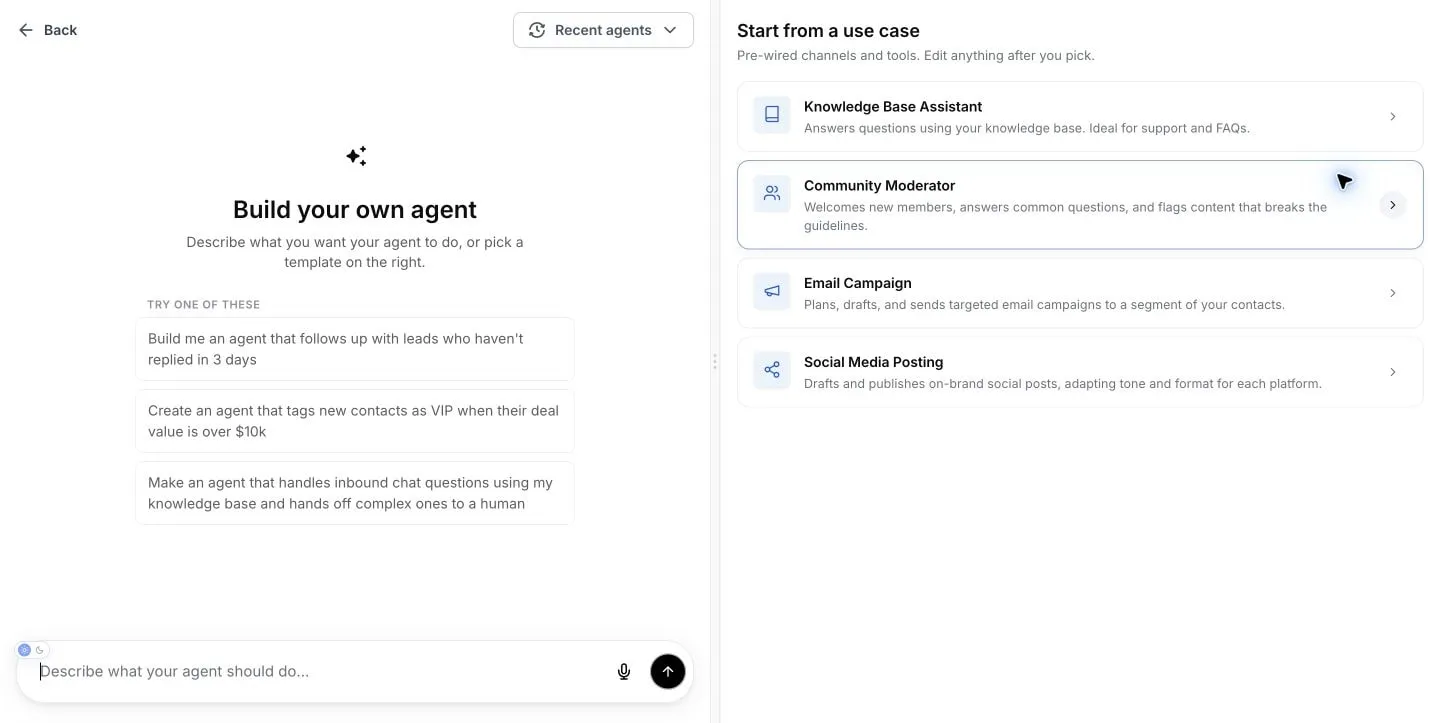
Build one in Agent Studio by describing the job in plain English, like "follow up with leads who haven't replied in 3 days." Choose the CRM access it gets and the knowledge it uses. It runs in chat, from an event, or on a schedule, and hands work to your team when your rules say so.
- Only the permissions you grant
- Test it first: 30 free test runs each month
- 100 runs a month with Growth, 1,000 with Unlimited
-
Ask AI
Pay-per-use or AI Employee
Ask questions or hand off everyday tasks in the app, on mobile, or by WhatsApp text: look up a contact, update a deal, check the calendar, draft a follow-up.
-
Workflow AI
Included · premium actions extra
Describe the automation you want, and the builder lays out the workflow for you to review and edit.
Builds and writes
Sites, apps, and copy from a description
AI Studio
Pay-per-use or AI Employee
AI Studio is the AI app builder inside SMBcrm. Describe a client portal, a quote calculator, or a storefront, and it builds a working web app with logins, a database, and checkout from your catalog. Forms in your app can create contacts and start workflows.
- Database, user logins, and file storage
- Checkout from your SMBcrm catalog
- Edit by chatting, clicking, or opening the code
AI Studio Cloud is billed separately: the Tiny database is free, larger sizes are billed hourly, and file storage is billed for what you store.
Explore AI Studio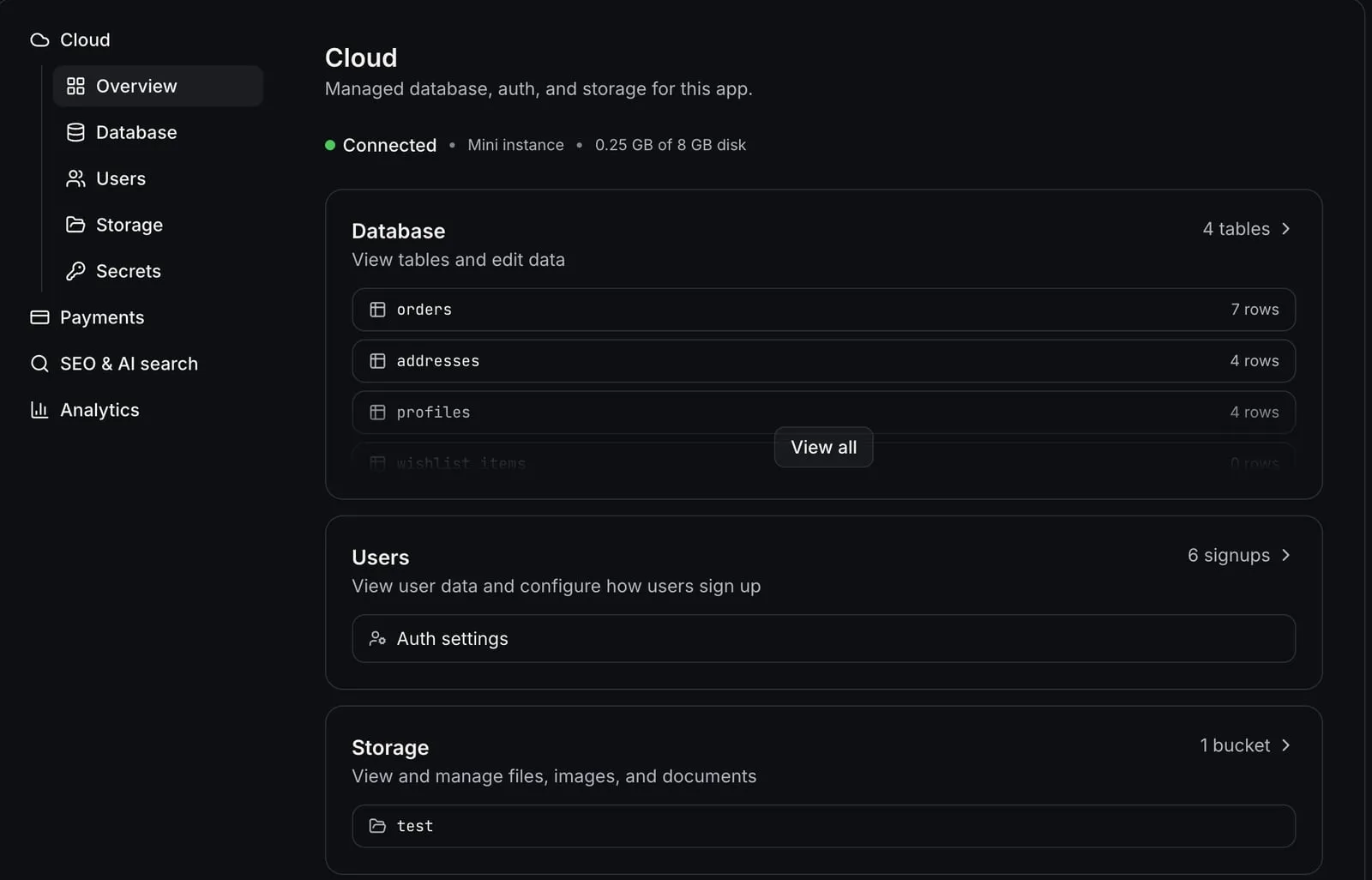
-
Website AI
Included · fair use
Generate and edit website pages in plain language in the drag-and-drop builder.
-
Funnel AI Builder
Included · fair use
Build funnel pages and copy for a campaign, ready to edit in the funnel builder.
-
Content AI
Pay-per-use or AI Employee
Drafts emails, social posts, ad copy, and website copy in your brand voice for you to edit before it goes out.
Standard marketing site or funnel? Use the builders with Website AI, included on every plan. Need logins, stored data, or checkout? That's AI Studio.
Similar names, different jobs
-
AI Studio builds sites and apps.
Pay-per-use or AI Employee.
-
Agent Studio is where you build Managed Agents, which do tasks for you.
Monthly runs with AI Employee, or pay-per-use.
-
Ask AI is the copilot you chat with in the app.
Pay-per-use or AI Employee.
How AI is billed, in three parts
Every plan can use every AI product. What changes is how it's billed: some AI is included, the rest is pay-per-use, and the AI Employee add-on covers most everyday AI with monthly allowances.
Included on every plan
- Website AI and Funnel AI Builder: included on every plan, subject to fair use
- Workflow AI Builder, Email AI, and Knowledge Base: no added AI charge
Premium AI workflow actions, external models, and email delivery can cost extra.
Pay-per-use
- Conversation AI, Voice AI, Content AI, Reviews AI, Ask AI, AI Studio, and Managed Agents, billed at posted usage rates
- Pay-per-use AI draws from your plan's monthly usage credit first ($10 on Startup, $98 on Professional)
AI Employee add-on
- Growth $97/mo or Unlimited $147/mo, on any plan
- Unlimited is included with Enterprise
- Covers most everyday AI with monthly or five-hour allowances (see the table)
| Product | Without AI Employee | Growth · $97/mo | Unlimited · $147/mo Included with Enterprise |
|---|---|---|---|
| Conversation AI | Without AI Employee Pay-per-use | Growth · $97/mo 1,000 responses/mo | Unlimited · $147/mo Unlimited* |
| Voice AI Agents | Without AI Employee Pay-per-use | Growth · $97/mo 100 combined minutes/mo | Unlimited · $147/mo Unlimited* |
| Content AI | Without AI Employee Pay-per-use | Growth · $97/mo Unlimited* | Unlimited · $147/mo Unlimited* |
| Reviews AI | Without AI Employee Pay-per-use | Growth · $97/mo Unlimited* | Unlimited · $147/mo Unlimited* |
| Managed Agents (Agent Studio) | Without AI Employee Pay-per-use · 30 free test runs/mo | Growth · $97/mo 100 runs/mo | Unlimited · $147/mo 1,000 runs/mo |
| Ask AI | Without AI Employee Pay-per-use | Growth · $97/mo Included usage in five-hour windows | Unlimited · $147/mo 3x Growth per five-hour window |
| AI Studio | Without AI Employee Pay-per-use | Growth · $97/mo Included usage in five-hour windows | Unlimited · $147/mo 3x Growth per five-hour window |
| Conversation & Voice prompt optimizers | Without AI Employee Not included | Growth · $97/mo Included | Unlimited · $147/mo Unlimited* |
| Website AI · Funnel AI Builder | Without AI Employee Included (fair use) | Growth · $97/mo Same | Unlimited · $147/mo Same |
| Workflow AI Builder | Without AI Employee Included (premium actions extra) | Growth · $97/mo Same | Unlimited · $147/mo Same |
* Subject to fair use.
AI Employee does not cover telephony, SMS, email delivery, premium workflow actions, or external models. AI Studio Cloud database sizes above Tiny and file storage are billed separately.
Growth overages and other pay-per-use behavior depend on the usage limits configured in your account.
Which do I need?
-
Trying one AI job, or using it now and then.
Then stay on pay-per-use. It draws from your plan's monthly usage credit first ($10 on Startup, $98 on Professional), then posted rates. Professional pays lower per-use rates than Startup.
-
AI answers your chats or calls most days.
Then Growth covers 1,000 Conversation AI responses and 100 Voice AI minutes a month, plus Content AI and Reviews AI.*
-
AI is part of every shift, or you run agents across the team.
Then Unlimited costs $50 a month more than Growth. It makes the four everyday products unlimited,* gives 10x the agent runs (1,000 vs. 100), and 3x Ask AI and AI Studio usage.
-
You're on Enterprise.
Then Unlimited is already included.
* Subject to fair use.
Start with one job
-
Pick one job.
Missed calls, slow replies, a follow-up that never gets sent. Start where the work piles up, and leave the rest of your workflow as it is.
-
Test it before customers see it.
Run a Managed Agent in the test area, keep Reviews AI on draft replies, and review Content AI drafts before anything goes out.
-
Set the handoff, then watch it.
Decide when a person takes over, choose which channels and contacts an AI handles, and check its work as usage grows.
Frequently Asked Questions
Is AI included in every SMBcrm plan?
What does the AI Employee add-on include?
What isn't covered by AI Employee?
What's the difference between AI Studio, Agent Studio, and Managed Agents?
Can AI answer my customers automatically?
Will AI send anything without my review?
Do I need technical skills to use AI in SMBcrm?
What is AI Studio?
Can I build my own AI agents?
AI works alongside the rest of SMBcrm:
New to AI in a CRM? See how it fits together on the small business AI platform overview.
Keep exploring
Guides and updates for this workflow
See setup ideas and specific product changes before choosing your next step.
Start with one job for AI
Pick a plan, turn on the AI you need, and add AI Employee only if your usage calls for it. New subscriptions come with a 60-day money-back guarantee.
-
60-day money-back guarantee
Eligible Startup and Professional initial subscription fees only. Usage and add-ons are excluded. Read the refund terms.
-
No setup fees
Plan your setup with training and support
-
Cancel anytime
No long-term contracts, stay because you want to