SMBcrm’s AI workflow tools now track each AI build or edit as a restorable artifact card in the chat. This gives workflow builders a safer way to experiment, compare iterations, and roll back changes from the same conversation.
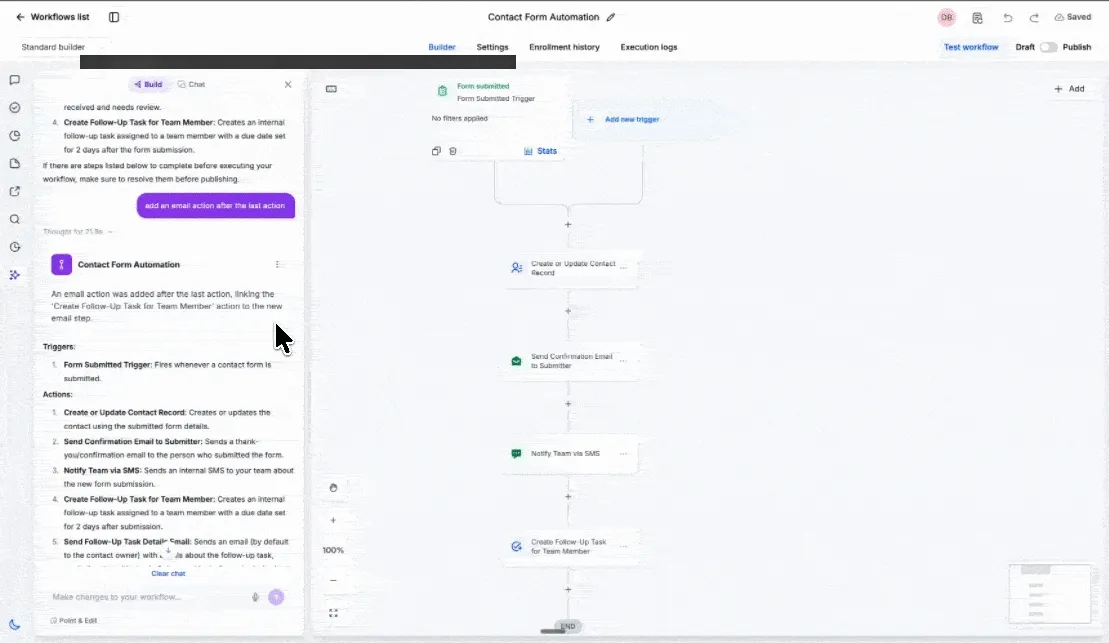
What changed
- Artifact card for every AI iteration: Each build or edit from the AI Assistant creates a card inline in the chat where the change was made.
- Current version indicator: The card matching the workflow canvas shows a purple border so users can identify the active iteration.
- One-click restore: Open the three-dot menu on an older card and select “Restore this version” to revert the canvas.
- Non-destructive restores: Restoring an older iteration keeps newer iterations available, so users can move between versions without deleting later work.
- Unsaved indicator: When auto-save is off for the account, cards show an “Unsaved” pill until the workflow is saved manually. The pill does not appear when auto-save is on.
- Unified Version History: “Show in version history” opens the Version History tab, where AI and manual versions appear in one timeline. Version History remains the source of truth for version numbering.
How to use it
- Prompt the AI Assistant to build or edit a workflow in automation.
- Review the artifact card that appears in chat. The purple border marks the current version.
- Prompt another change. The new card becomes current, and the previous card includes “Restore this version” in its three-dot menu.
- Use the three-dot menu on any card to restore that iteration or open it in Version History.
Why it matters
AI workflow edits previously had no recovery path if a trigger was removed or an action configuration was overwritten. Restorable artifact cards make it easier to test changes without rebuilding by hand.
By sending AI-created iterations into the same Version History timeline as manual versions, SMBcrm keeps workflow version numbering in one place instead of splitting AI and user changes into separate histories.
Need Help Applying This Update?
Want help turning this update into a working part of your CRM, marketing, or automation setup?
Get Started or schedule a demo and we’ll help you map the right next step.