Calendly Reschedules Now Update Appointments
SMBcrm now handles Calendly appointment reschedules more like native calendar reschedules. When an appointment is moved in Calendly, the existing SMBcrm appointment is updated instead of recreated.
What Changed
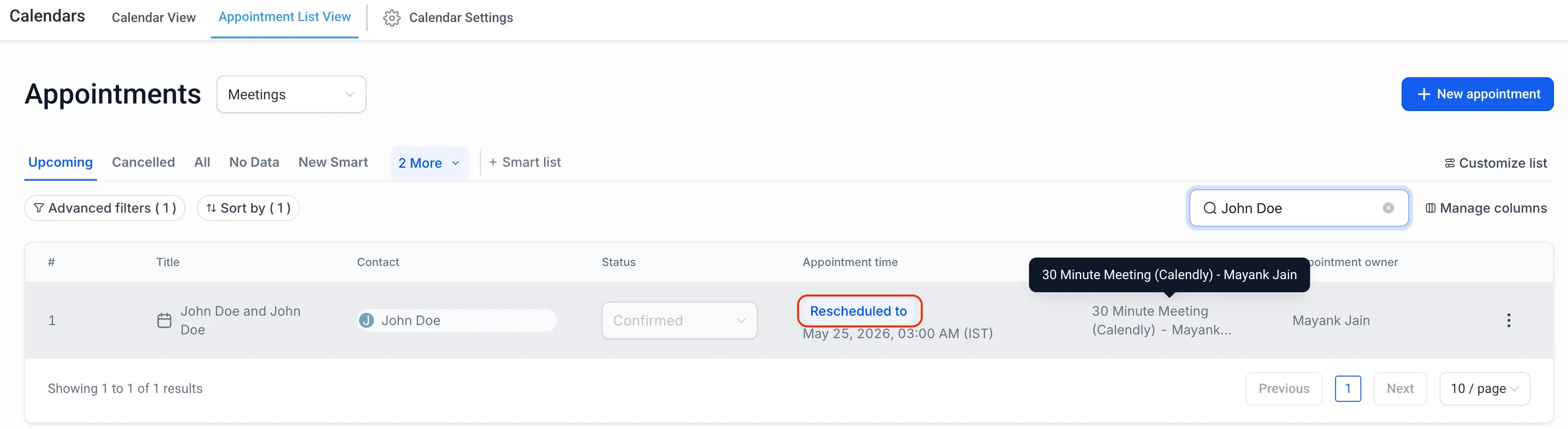
- Calendly reschedules are treated as true appointment reschedules in SMBcrm.
- The existing appointment is updated with the new date and time.
- The appointment is marked as Rescheduled.
- The previous appointment date and time are preserved for tracking.
- Reschedule tags and workflow conditions apply correctly.
Why It Matters
This creates a more consistent scheduling experience for teams that use Calendly with SMBcrm calendars. Workflows that use the Rescheduled = True filter can now also apply to Calendly reschedules, improving automation reliability and appointment tracking accuracy.
In Case You Missed It
For another recent update, see Upload and Download Folders in Media Center.
Need Help Applying This Update?
Want help turning this update into a working part of your CRM, marketing, or automation setup?
Get Started or schedule a demo and we’ll help you map the right next step.