Contact Tag Updates Now Require Confirmation
SMBcrm has improved contact tag management in the Contacts area. Tag changes now require confirmation before they are applied, giving users more control when managing contacts in CRM & Sales.
This helps reduce accidental tag updates and prevents unintended workflow triggers caused by selecting or deselecting the wrong tag.
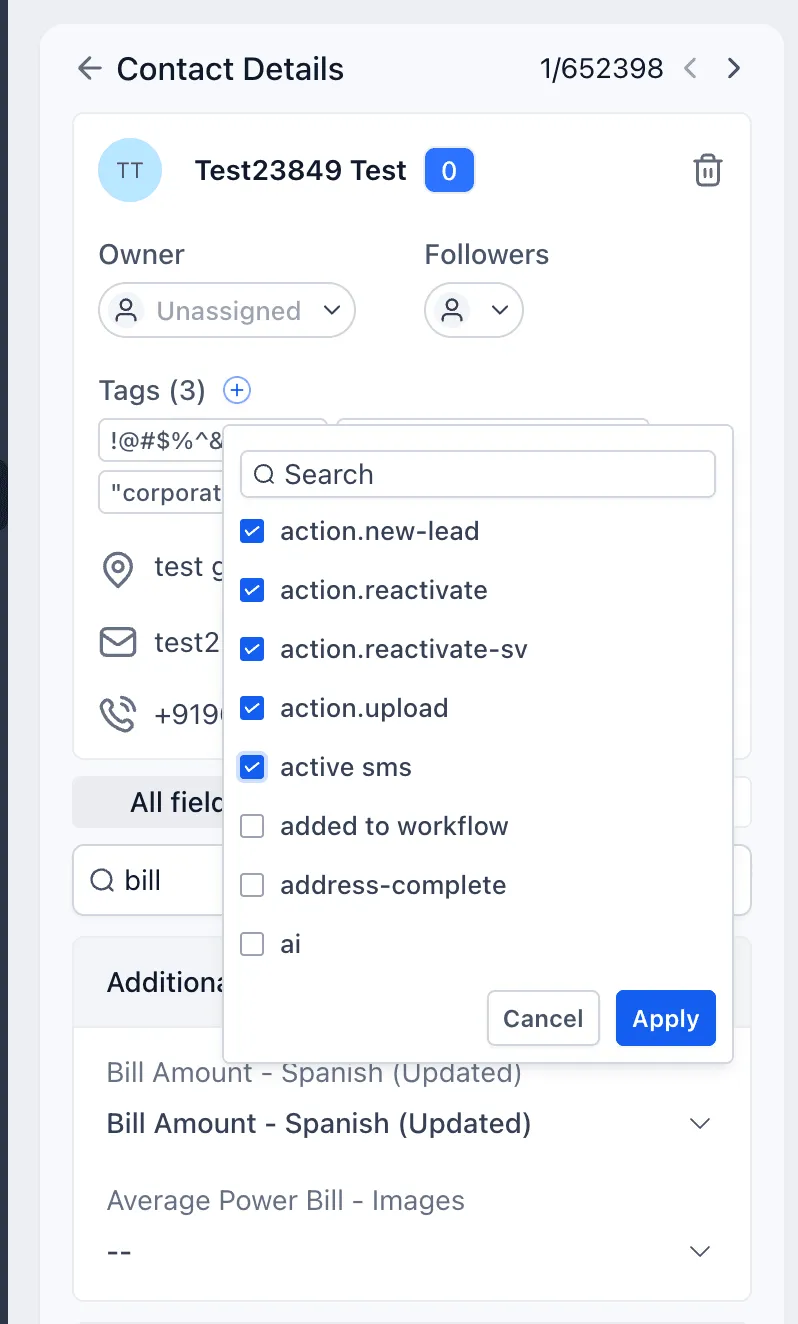
What Changed
- Added an Apply button for contact tag changes
- Added a Cancel button to discard unintended edits
- Added confirmation for both adding and removing tags
- Reduced accidental workflow triggers from unintended tag updates
- Improved safety and accuracy when managing contact tags
How It Works
- Open the tag dropdown for a contact.
- Select or deselect the tags you want to add or remove.
- The Apply button becomes active.
- Click Apply to confirm the tag changes.
- Click Cancel if you do not want to proceed.
Workflow triggers now run only after the tag update is intentionally applied.
Upcoming Tag Management Improvements
SMBcrm is continuing to improve the tag management experience with planned enhancements including:
- Tag categories for better organization
- Tag colors for easier identification
- Category and color visibility inside the tag dropdown
- Selected tag counts displayed for each category
In Case You Missed It
You may also want to read about default values for email personalization.
Need Help Applying This Update?
Want help turning this update into a working part of your CRM, marketing, or automation setup?
Get Started or schedule a demo and we’ll help you map the right next step.