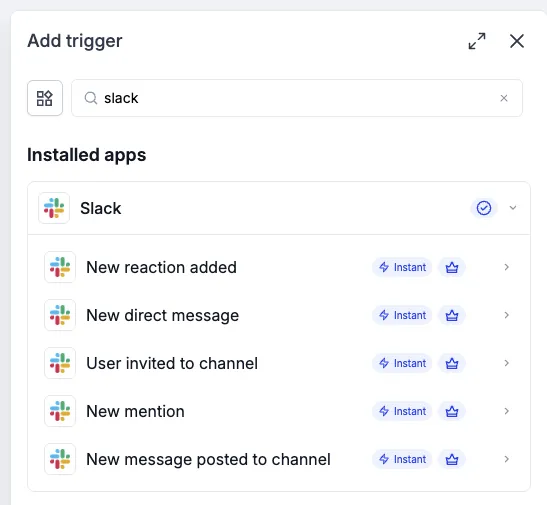
Five new instant Slack triggers let you start SMBcrm workflows from team conversations and activity. Use these triggers in SMBcrm automation to route requests, welcome teammates, and notify the right people without manually monitoring channels.
Available Triggers
- New direct message: Starts a workflow when someone sends a direct message to your Slack app (bot).
- User invited to channel: Starts a workflow when a user joins or is invited to a selected channel.
- New mention: Starts a workflow when your Slack app (bot) is @-mentioned in a channel it has been added to.
- New message posted to channel: Starts a workflow when a message is posted to a selected public or private channel.
- New reaction added: Starts a workflow when an emoji reaction is added to a message in a selected channel.
How to Set Up a Slack Trigger
- Go to Automation > Workflows and open a workflow.
- Click Add trigger and search for Slack.
- Choose a trigger and select your connected Slack account.
- Configure the channel or filters where applicable.
Ways to Use These Triggers
Route messages or app mentions to a triage channel, post an onboarding message when someone joins a team channel, or alert reviewers when feedback receives an emoji reaction. You can also notify another team when a message arrives in a shared request channel.
Important Details
- All five are Premium triggers.
- The direct message trigger listens for messages sent to the Slack app (bot).
- For mention triggers, add the Slack app to the channel first.
- Channel lists include public and private channels visible to the connected Slack user.
Release Images
Need Help Applying This Update?
Want help turning this update into a working part of your CRM, marketing, or automation setup?
Get Started or schedule a demo and we’ll help you map the right next step.