Goal Events Now Support Task Status in Workflows
Goal Events in SMBcrm automation now support Task Status as a goal type. Workflow builders can route contacts to a goal branch when a task tied to that contact is created or completed.
What Changed
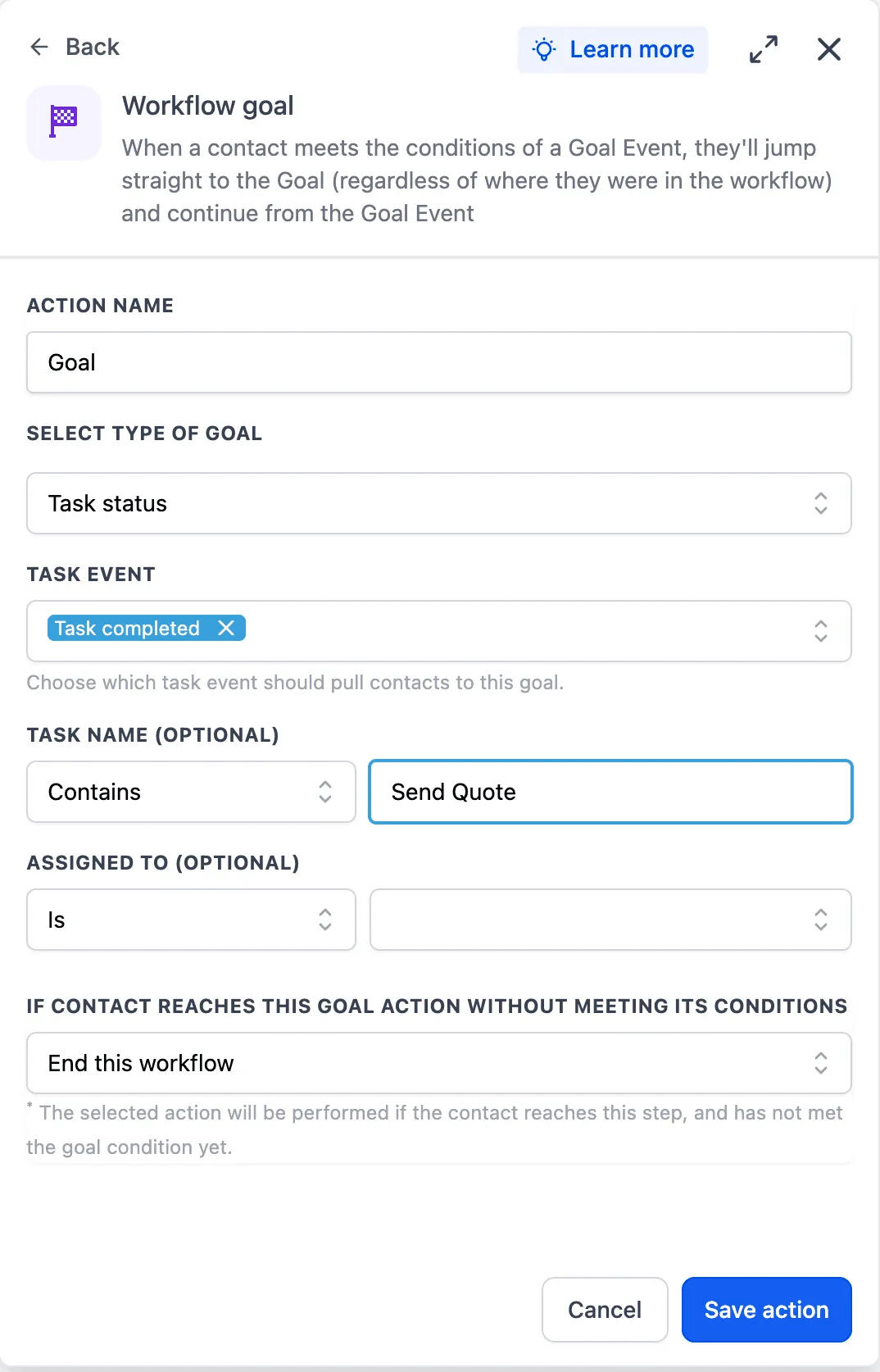
You can now select Task Status inside a Goal Event action and choose either:
- Task Created
- Task Completed
The same filter options available in task-based workflow triggers can also be used here, including filters for task Name or Assignee.
How to Use It
- Add or edit a Goal Event action in a workflow.
- Select Task Status as the goal type.
- Choose Task Created or Task Completed.
- Apply any needed task filters.
Why It Matters
Task lifecycle events were already available as workflow triggers, but they were not available as goals. This update helps builders route contacts based on real CRM task progress without adding extra workflow steps.
For example, a consulting team can create a CRM task from a form submission. When the assigned onboarding task is marked Task Completed, the contact can move to the goal branch and receive the next onboarding email.
In Case You Missed It
You may also want to read Array Formatter Is Free with a Clearer Workflow UI.
Need Help Applying This Update?
Want help turning this update into a working part of your CRM, marketing, or automation setup?
Get Started or schedule a demo and we’ll help you map the right next step.