Inactive Domain Email Handling Improved
SMBcrm now better protects email delivery when a domain mapped to a campaign or other domain configuration becomes inactive or unverified.
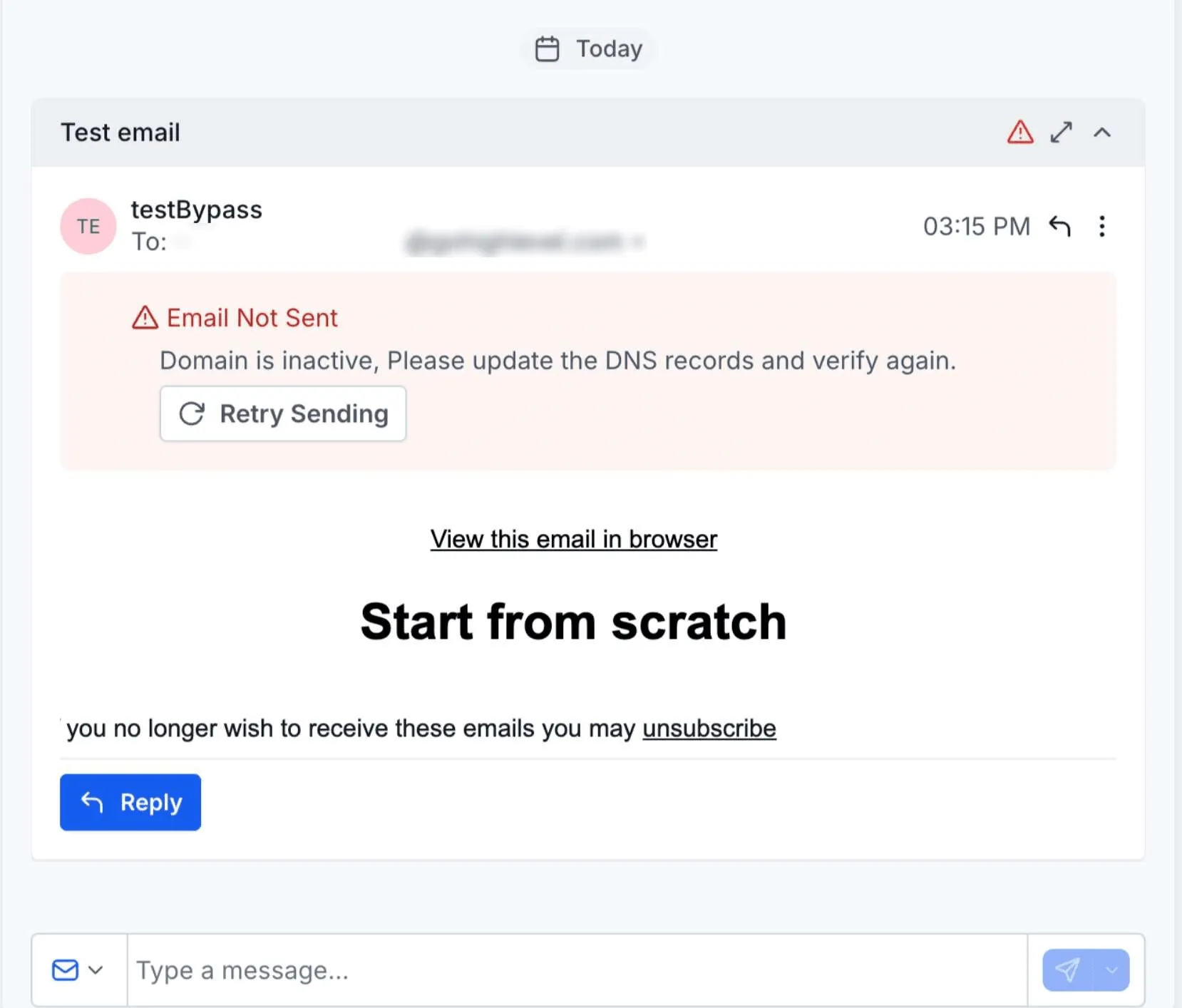
Previously, emails could continue attempting to send after the mapped domain became inactive. With this update, SMBcrm automatically stops those email attempts and shows a clear failure message in Conversations.
What Changed
- Emails are stopped automatically if the mapped campaign domain becomes inactive or unverified.
- Failed email attempts display a clear error message in Conversations.
- Users get better visibility into delivery issues caused by domain verification status changes.
Why It Matters
This improvement helps prevent failed or unauthorized email delivery attempts from inactive domains. It also makes troubleshooting easier by showing domain verification issues directly where users review email activity.
How It Works
- If a campaign domain changes from active to inactive or unverified, SMBcrm stops email sending for messages using that domain.
- The email activity is marked as failed.
- Conversations shows a message explaining that the email failed because the domain is not verified.
In Case You Missed It
For another recent update, read Upload and Download Folders in Media Center.
Related SMBcrm Features
Need Help Applying This Update?
Want help turning this update into a working part of your CRM, marketing, or automation setup?
Get Started or schedule a demo and we’ll help you map the right next step.