New Blog Author Layout Improves Author Profiles
SMBcrm blogs now include a modern author layout designed to make author information clearer and more useful for readers.
What changed
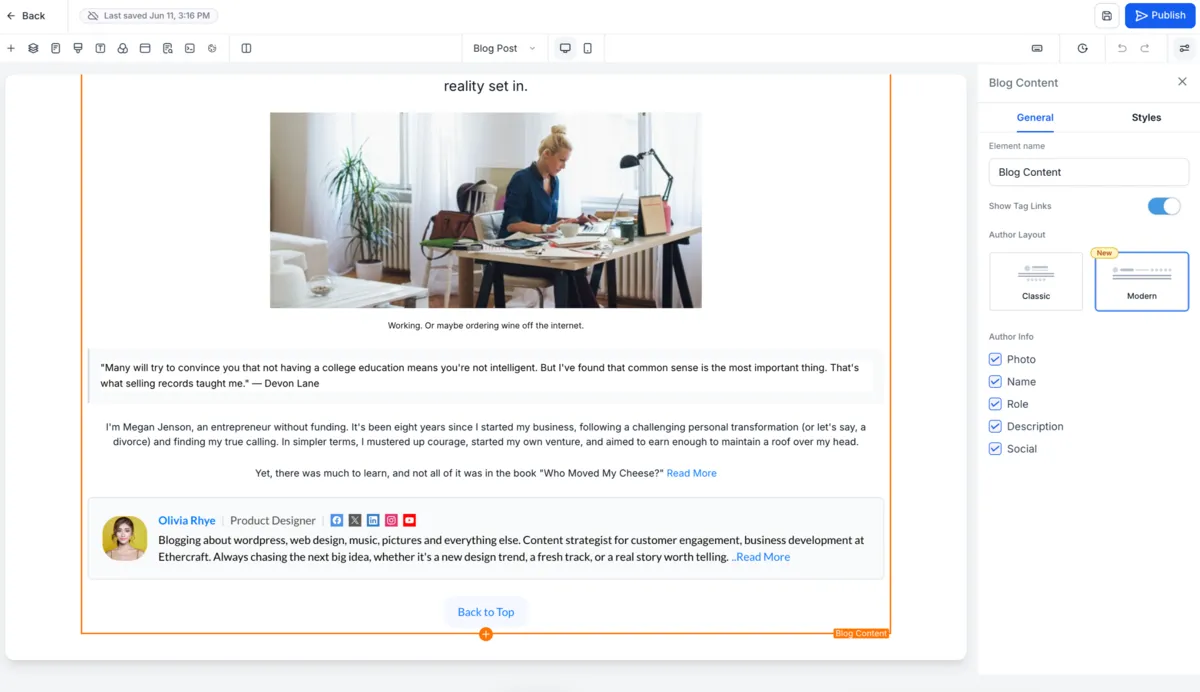
Blog posts can now use one of two author layout options:
- Modern Preview: A card-based author layout with a cleaner visual hierarchy. This is the default layout for newly created blog posts.
- Classic Preview: The existing author layout for users who prefer the current experience.
The updated author section can display structured profile details, including:
- Profile image
- Author name
- Designation or role
- Author bio
- Social media links
- Email address
Expandable author bios
Long author bios are automatically condensed to keep the blog layout clean. Readers can select Read More to view the full author description without disrupting the page experience.
Responsive across devices
The author section is optimized for desktop, tablet, and mobile layouts, helping blog posts present author details consistently across screen sizes.
How to use it
To update the author layout for a blog post:
- Go to Sites > Blogs.
- Open Blog Post Settings.
- Select the preferred Author Layout.
- Configure author details, social links, and email information.
- Publish the blog.
Notes
- The Modern Author Layout is the default for newly created blog posts.
- Existing blogs continue using their current layout unless updated manually.
- Dedicated author profile pages are not included in this release.
- Multiple authors per blog post are not currently supported.
In Case You Missed It
You may also want to read Calendly Reschedules Now Update Appointments.
Need Help Applying This Update?
Want help turning this update into a working part of your CRM, marketing, or automation setup?
Get Started or schedule a demo and we’ll help you map the right next step.