Calendar notifications now cover both default and custom recurring appointments more consistently. The changes are live automatically for newly booked or edited appointments; no setup is needed.
What changed
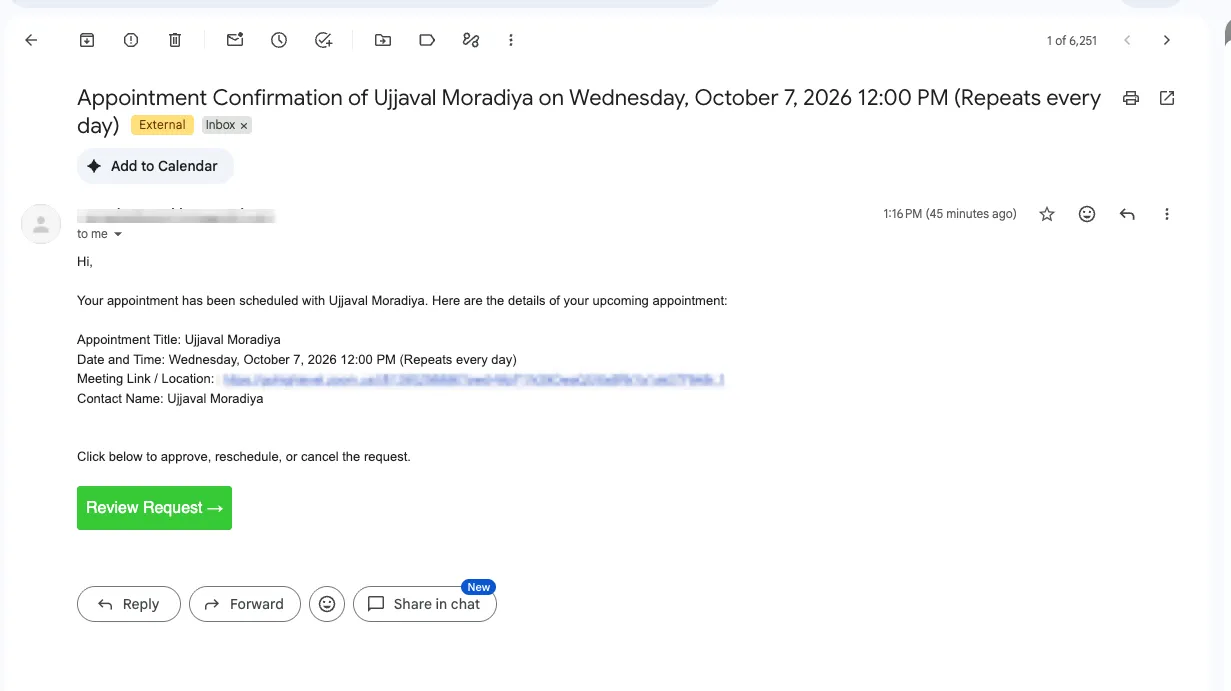
- One confirmation per booking: Default and custom recurring appointments send one confirmation or unconfirmed notification covering the series, rather than one per occurrence. Custom recurring appointments created in-app did not previously send these notifications.
- Reminders for each occurrence: Reminders and follow-ups continue individually for every appointment in a series and now also apply to custom recurrences.
- Notifications when custom series change: Reschedule and cancellation notifications follow the option selected when making a change. “This appointment” notifies for one appointment, while “All appointments” sends one notification for the series. For reschedules, “This and following” sends one notification. Notifications for changes to default recurring appointments remain specific to the affected appointment.
- Recurrence details: Notifications for custom recurrences can show the recurrence pattern alongside the appointment date and time. To include these details, use the appointment date and time custom value in the notification template.
These changes apply to calendar notifications only. Workflows are not affected.
Release Images
Need Help Applying This Update?
Want help turning this update into a working part of your CRM, marketing, or automation setup?
Get Started or schedule a demo and we’ll help you map the right next step.
Explore this in SMBcrm
Connect booking to the next conversation.
Explore calendars and lead capture, then see how a booking fits into the wider CRM workflow.
Explore calendars and lead captureAlready using this feature? Find setup help