Retry Failed Social Planner Posts
SMBcrm users can now recover from failed Social Planner publishing attempts more quickly by retrying or rescheduling the original post.
What changed
Failed posts now include recovery actions directly in the post actions menu. Users can:
- Select Retry Now to publish again using the original content, settings, and connected accounts
- Select Reschedule Post to choose a new future date and time
- Access recovery options from List View, Grid View, or Post Preview
If a retry succeeds, the post moves to the Published state. If a failed post is rescheduled, it moves back to the Scheduled state and publishes at the updated time.
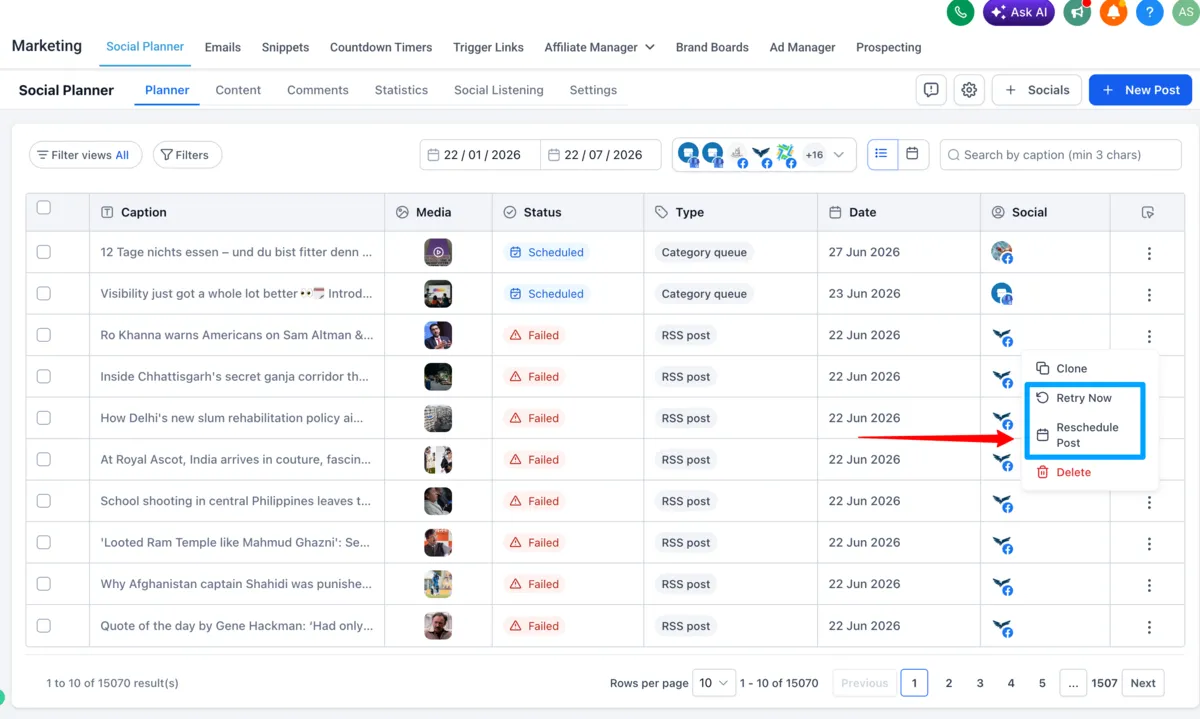
How to use it
- Go to Marketing → Social Planner.
- Open the Failed Posts section.
- Click the 3-dot menu on a failed post.
- Choose Retry Post Now or Reschedule Post.
- Confirm the action.
Why it matters
This update helps users recover from temporary publishing issues without cloning posts or recreating content. It can reduce manual work, keep campaigns moving, and make common publishing recovery steps easier to handle.
Notes
- This applies only to posts in the Failed state.
- Bulk retry actions are not included in this release.
- Automatic retries are not currently supported.
In Case You Missed It
You may also want to read Conversations SLA Performance Dashboard.
Need Help Applying This Update?
Want help turning this update into a working part of your CRM, marketing, or automation setup?
Get Started or schedule a demo and we’ll help you map the right next step.