Use Opportunity Owners and Followers in If/Else
SMBcrm now supports Opportunity Owners and Opportunity Followers as conditions in If/Else workflow branches. This helps teams route contacts based on whether an opportunity has assigned owners or followers.
This update improves how teams use automation with opportunity data in the CRM, especially for routing, notifications, and follow-up workflows.
What Changed
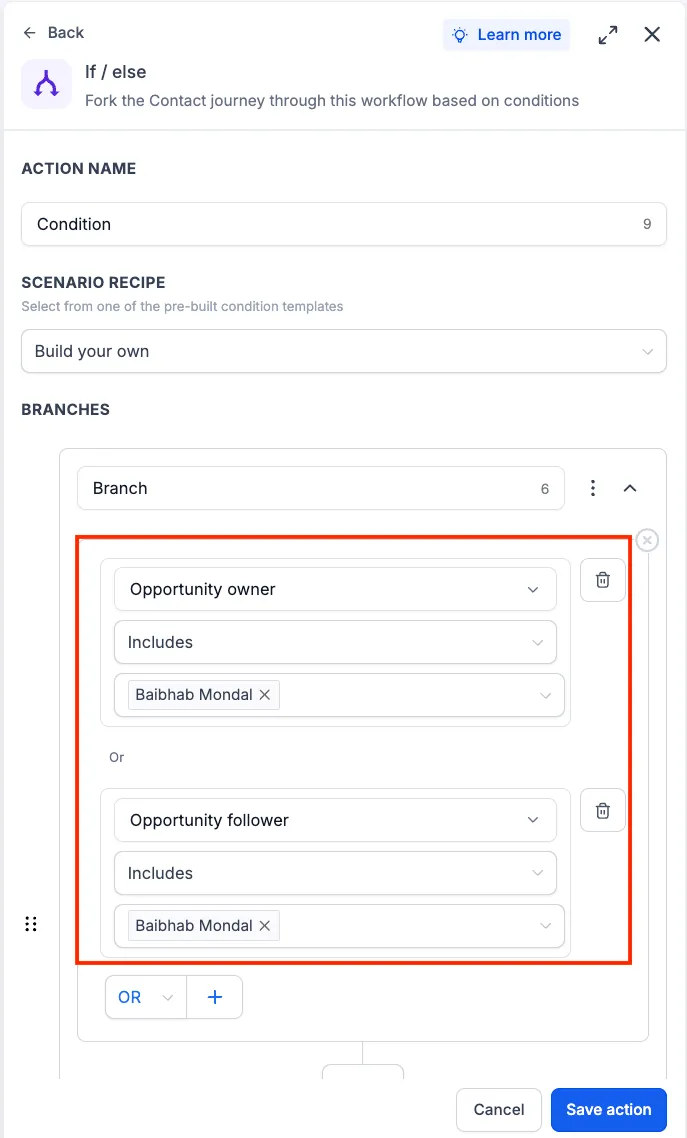
When an If/Else step evaluates an opportunity, it can now check the Opportunity Owners and Opportunity Followers fields. The workflow routes contacts down the matching branch based on the condition you configure.
How to Use It
- Add or edit an If/Else action in your workflow.
- Select Opportunity Owners or Opportunity Followers as the condition field.
- Configure the condition and save the workflow.
Example Use Case
You can route opportunities into a dedicated follow-up sequence when an Opportunity Owner has been assigned.
Additional Notes
- Available in If/Else workflow conditions.
- Supports both Opportunity Owners and Opportunity Followers fields.
- Conditions are evaluated using the owners and followers assigned to the opportunity when the workflow reaches the If/Else step.
- Existing workflows are unaffected unless these conditions are explicitly configured.
In Case You Missed It
You may also want to read Notify Followers and Opportunity Owners in Workflows.
Need Help Applying This Update?
Want help turning this update into a working part of your CRM, marketing, or automation setup?
Get Started or schedule a demo and we’ll help you map the right next step.