SMBcrm Ad Manager now makes it easier to manage keyword lists for Google Ads campaigns. For teams using lead capture and search advertising together, bulk keyword entry can reduce repetitive setup work.
What Changed
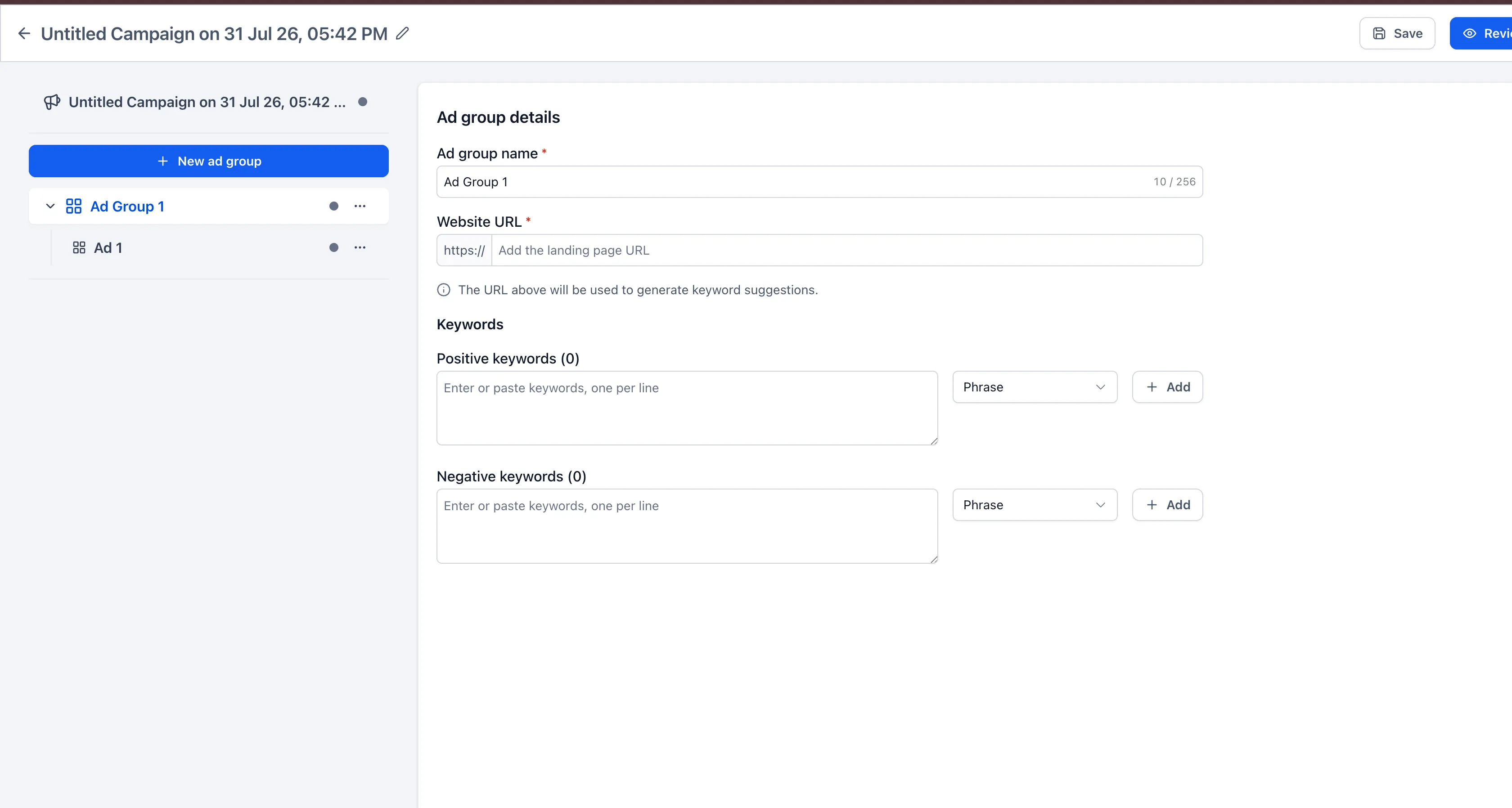
You can now add multiple positive or negative keywords at once in Google Ads campaigns. This update:
- Removes the previous 40-keyword limit for positive and negative keywords.
- Adds a larger text area for working with multiple keywords.
- Supports bulk pasting keywords separated by new lines or commas.
- Automatically removes duplicate keywords and extra blank spaces.
- Lets you choose the required match type and add keywords together.
How It Works
- Go to Ad Manager > Google Campaign > Ad Group.
- Open the Positive Keywords or Negative Keywords section.
- Type or paste multiple keywords into the keyword field.
- Separate keywords using new lines or commas.
- Select the desired match type and click Add.
Notes
- The update applies to both positive and negative keywords in Google Ads campaigns.
- Duplicate and empty keyword entries are removed during bulk entry.
- Keyword eligibility remains subject to Google Ads requirements.
Need Help Applying This Update?
Want help turning this update into a working part of your CRM, marketing, or automation setup?
Get Started or schedule a demo and we’ll help you map the right next step.