SMBcrm custom metrics now give teams more control over how dashboard KPIs are calculated. You can add filters to individual metrics inside a formula, use Meta Ads and Google Analytics as data sources, and build formulas in a full-page builder instead of a modal.
What Changed
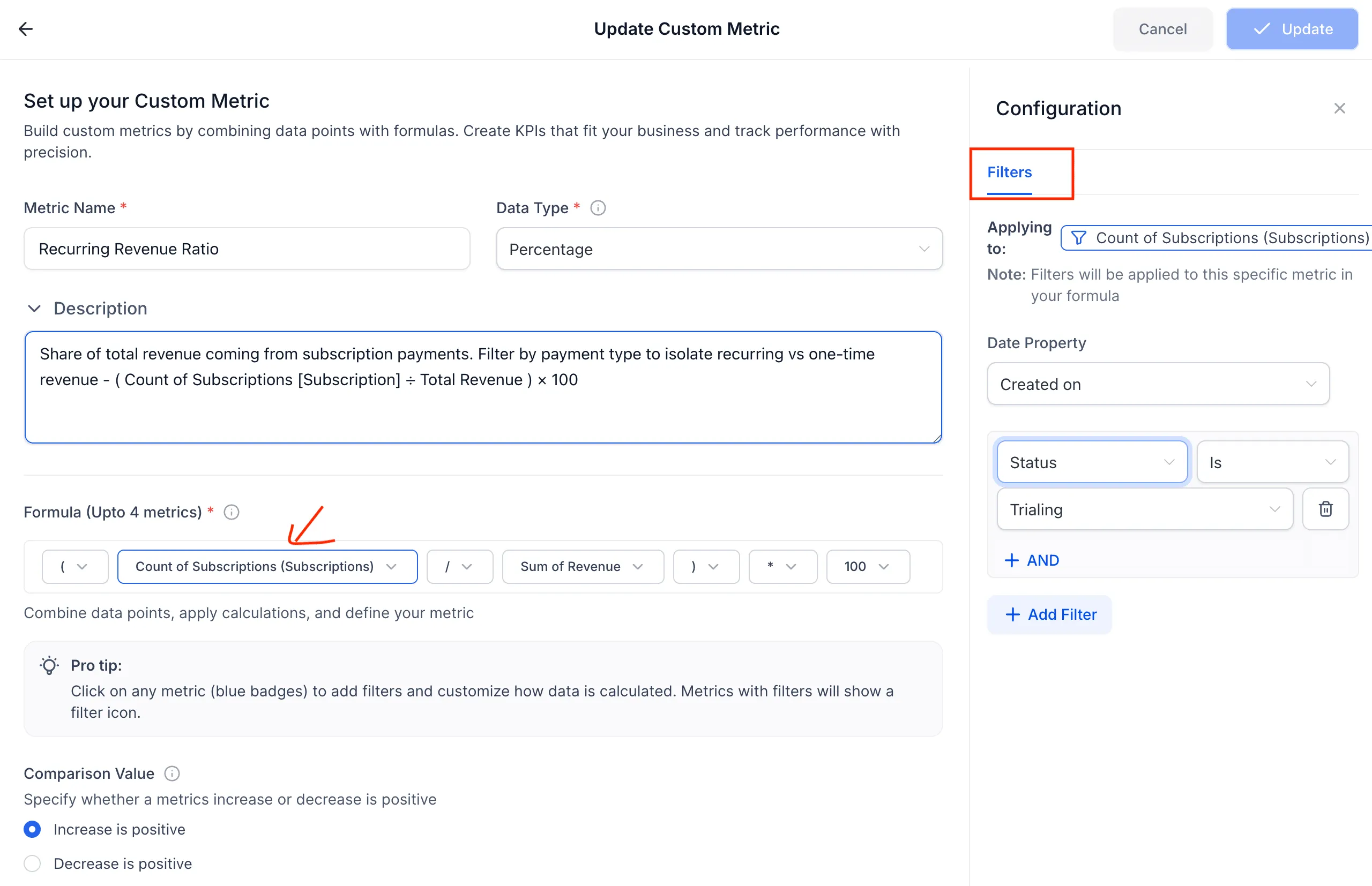
- Add filters to individual custom metrics in a formula, such as contact tag, pipeline, owner, agent, and more.
- Use Meta Ads as a data source, including Spend, Impressions, CTR, CPC, CPM, Conversions, and Reach.
- Use Google Analytics as a data source and combine GA data with CRM metrics in one formula.
- Build custom metrics in a full-page builder instead of a modal.
How It Works
- Go to your Dashboard and open or create a Custom Metric.
- In the formula builder, click any metric token to add filters.
- Set filter conditions, such as Tag = Customer, Pipeline = Sales, or Owner = a specific rep.
- To use Meta Ads or Google Analytics data, select the source from the metric picker under its category.
- Combine metrics with the formula builder, such as Sum of Spend / Count of Opportunities, then save.
Why It Matters
This update makes it easier to build segmented KPIs directly inside SMBcrm. For example, teams can track win rate by sales rep, conversion rate by lead source, or contact metrics filtered by tags like Customer or VIP.
It also helps connect marketing and CRM performance in one place. You can combine Meta Ads or Google Analytics data with pipeline metrics to calculate KPIs such as cost per lead or cost per opportunity.
Notes
- Filters support multiple conditions using AND logic per metric token.
- This update is available to all accounts with no plan restriction noted in the release.
In Case You Missed It
You may also want to read AI Builder for Workflows Gets a Major Upgrade.
Need Help Applying This Update?
If you’d like help rolling this out in SMBcrm, visit Support or request a demo.
Explore this in SMBcrm
Use the CRM to review your next decision.
Explore contacts, pipelines, and dashboards. Choose the records and definitions your team will use before relying on a report.
Explore CRM dashboardsAlready using this feature? Find setup help