Dynamic value chips in SMBcrm Automation now have three states instead of two. The update separates values available in the open workflow from valid values that are not supplied by that workflow, and from values that do not exist.
What changed
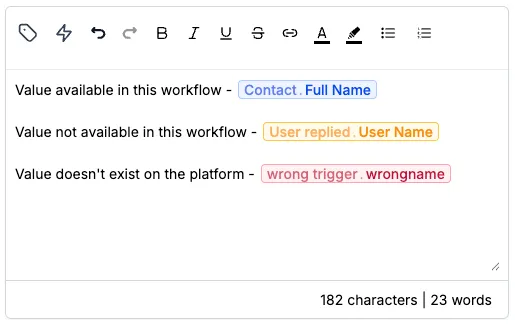
Previously, any dynamic value the builder could not resolve displayed as a red “value not recognized” chip. Now each chip is segmented into one of three states:
- Blue: The value is available in this workflow. The workflow can fill it from a contact record, a system value such as the current date, or an earlier step.
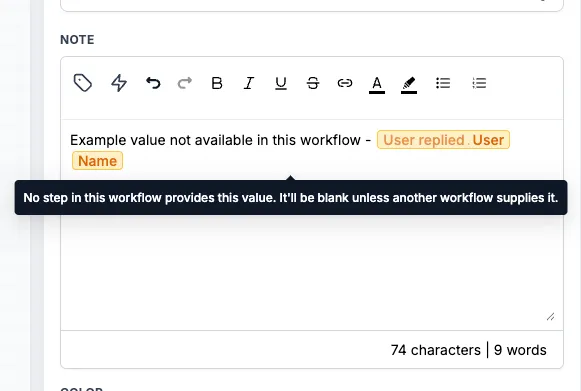
- Yellow: The value exists in SMBcrm, but this workflow does not currently supply it. For example,
{{sheet.10.rowNumber}}can appear yellow in a workflow with no Google Sheets step. It renders blank unless another workflow passes it in through Add to Workflow with pass input trigger parameters. - Red: The value does not exist in SMBcrm. For example,
{{applesheet.10.rowNumber}}will not render in any workflow.
Spacing is handled more consistently
Spacing inside handlebars no longer changes the chip result. For example, {{ attribution.first.url }} and {{attribution.first.url}} now match the same Attribution URL value.
Why it matters
This makes workflow setup clearer. Yellow means the value may need another source, while red means the value is wrong and should be corrected. For example, a typo such as {{contact.frist_name}} is still marked red.
Additional notes
- Yellow is a warning, not a blocker. You can save and publish the workflow as usual.
- This update changes the builder UI only.
- Values still resolve at execution time the same way they did before, so existing workflow behavior is unchanged.
In Case You Missed It
For another recent messaging improvement, read SMS Test Numbers Now Include a Country Picker.
Release Images
Need Help Applying This Update?
Want help turning this update into a working part of your CRM, marketing, or automation setup?
Get Started or schedule a demo and we’ll help you map the right next step.