Field Previews Improve Workflow Integration Setup
SMBcrm has improved the setup experience for integration-powered workflow actions and triggers. Users can now see required fields upfront, connect the right account without leaving their workflow setup, and select from multiple connected accounts where supported.
This makes automation workflows easier to configure and helps users understand what an integration step needs before completing the connection.
What Changed
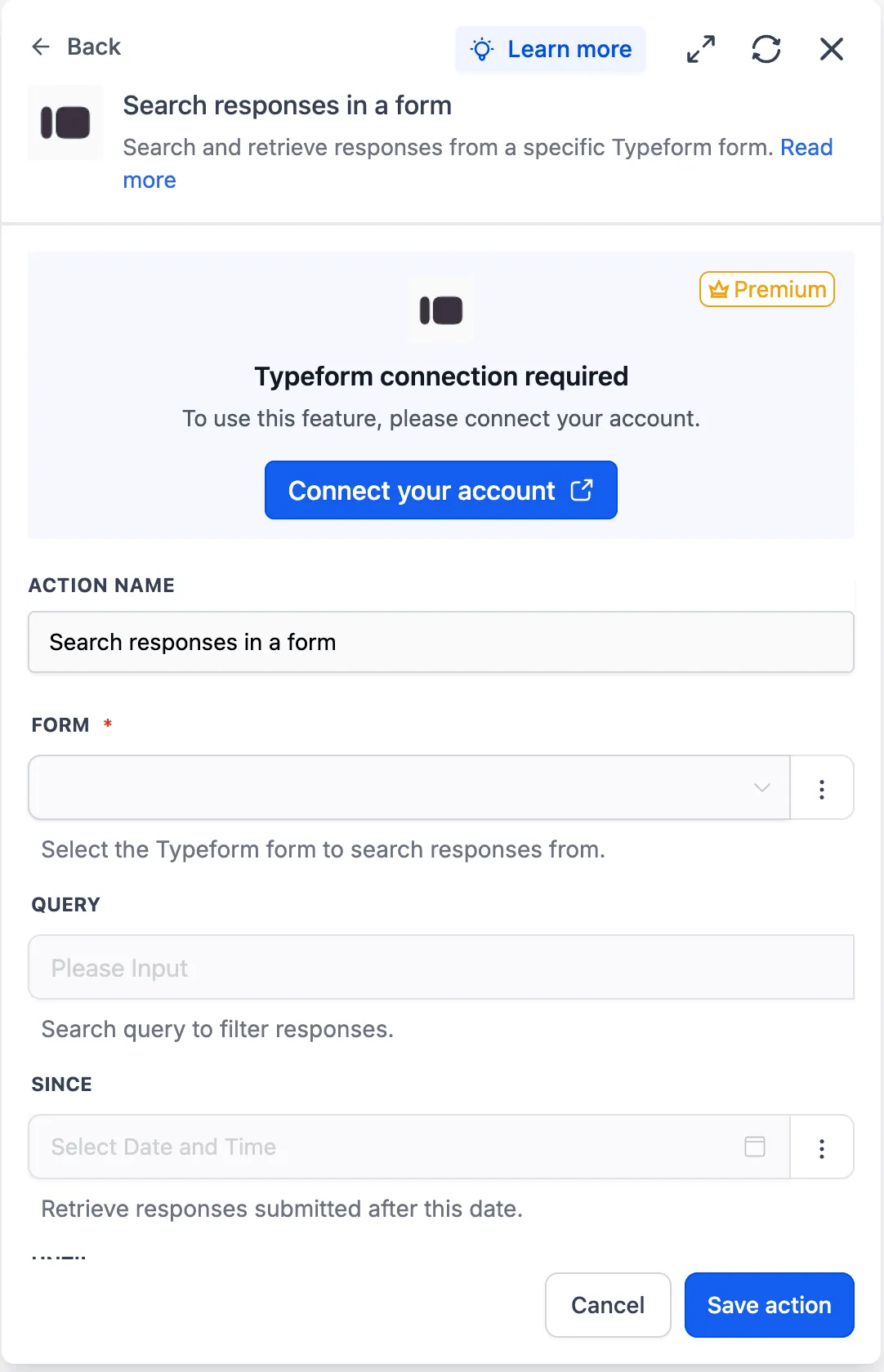
When an integration is not connected, the action or trigger panel now shows:
- A connection banner
- A locked preview of the available fields
- A prompt to connect the required account
Selecting Connect your account opens the integration setup in a new browser tab, so users can complete the connection without losing their workflow progress. After the account is connected, the fields unlock and the selected account appears directly inside the action or trigger.
How to Use It
- Open an integration-powered action or trigger in a workflow.
- Select Connect your account if no account is connected.
- Choose the connected account.
- Configure the available fields.
Why It Matters
Previously, users could discover missing integrations only after saving a workflow, with limited guidance on how to fix the issue. Users also could not always see which fields or options an integration supported before connecting an account.
This update helps reduce setup errors, keeps users in their workflow context, and makes integration-powered actions easier to evaluate and configure.
Example Use Cases
- A user opens a Typeform action from a workflow template and can preview the available fields before connecting an account.
- A user opens a Slack action with multiple connected accounts, selects the correct account, and the available connections reload for that account.
Additional Notes
- Available field options can now appear as a preview before an integration is connected.
- If a connected account is removed or becomes invalid, the step returns to a locked connection-required state.
- Some apps load fields step by step after connection, depending on earlier selections.
- Dynamic fields that depend on the selected account may reset when the account changes.
In Case You Missed It
You may also want to read about HubSpot actions and triggers added to workflows.
Need Help Applying This Update?
Want help turning this update into a working part of your CRM, marketing, or automation setup?
Get Started or schedule a demo and we’ll help you map the right next step.