Granular Gift Card Permissions for Team Access
SMBcrm now gives admins more specific control over which team members can access and perform actions across Gift Cards. This helps businesses limit access based on each user’s responsibilities while protecting Gift Card balances, customer information, and sensitive actions.
These controls are part of SMBcrm’s Payments & Commerce tools.
What changed
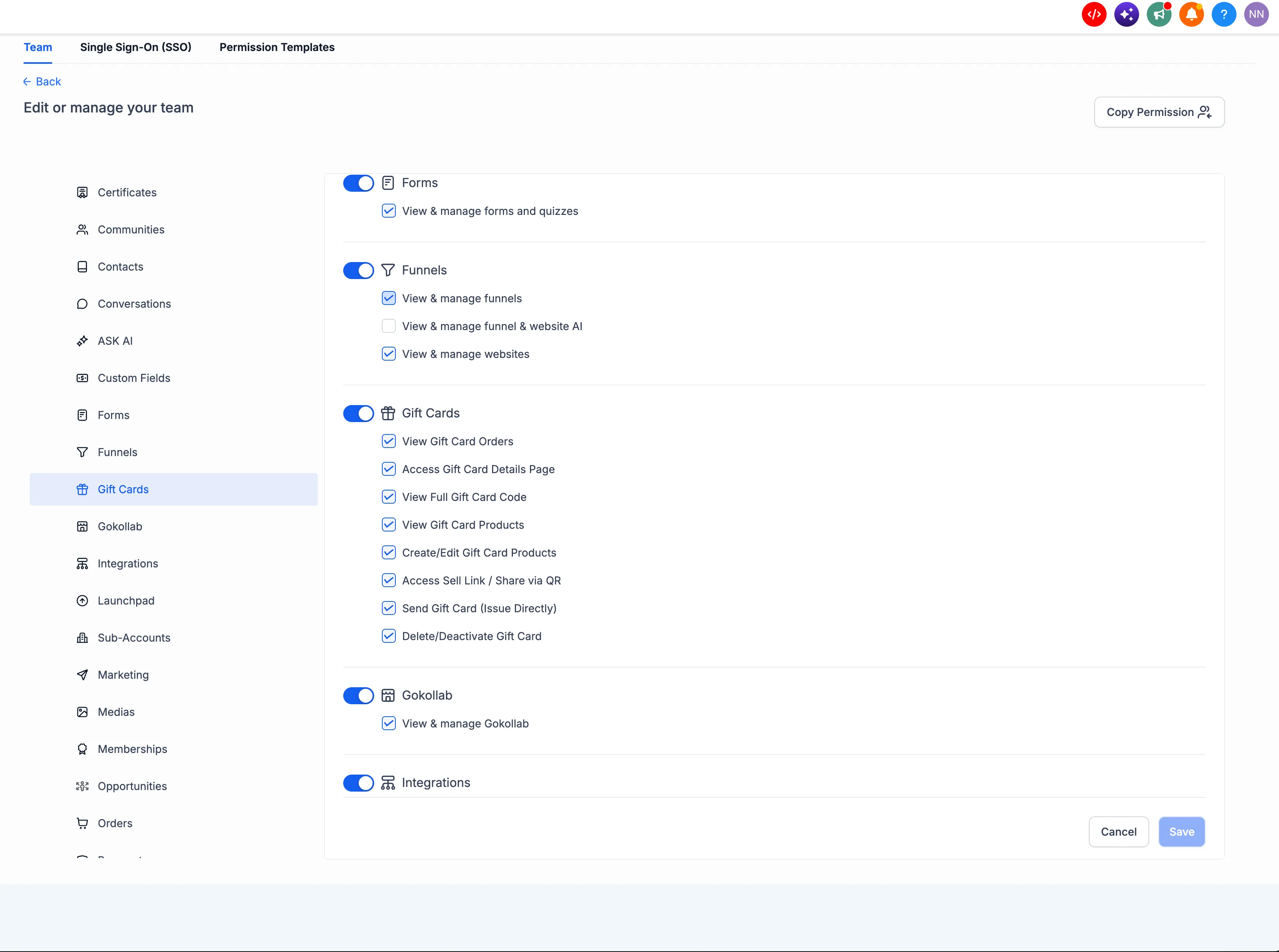
Admins can configure permissions for individual Gift Card capabilities, including:
- View Gift Card Orders and related order information
- View Gift Card Products and their configurations
- Create or edit Gift Card Products
- Access the Sell link or share a Gift Card Product by QR code
- Send Gift Cards directly to customers
- Reveal the full Gift Card code from the details page
- Access individual Gift Card Order details
- Delete or deactivate Gift Cards
More precise access control
Gift Card permissions also support assigned-data level access. For users, admins can choose to show only assigned data instead of all data, even when the user has access to the page.
Permissions are enforced across both the interface and the underlying actions. For example, a support team member can be allowed to view Gift Card Orders without being allowed to send Gift Cards, change Gift Card Products, or reveal the full Gift Card code.
The full Gift Card code is protected by its own permission, so users without that access cannot view the sensitive code from the Gift Card Order details page.
Where to configure it
Go to Settings → My Staff → Select Staff Member → Edit Icon → Roles & Permissions → Gift Cards.
From the Gift Cards section, admins can choose the permissions each user needs. Admins retain full access by default, while other roles can be limited to only the Gift Card capabilities required for their work.
Release Images
Need Help Applying This Update?
Want help turning this update into a working part of your CRM, marketing, or automation setup?
Get Started or schedule a demo and we’ll help you map the right next step.