SMBcrm has improved the Quiz Results Page builder with more styling controls, clearer category guidance, and easier navigation while editing quiz results pages.
What Changed
You can now:
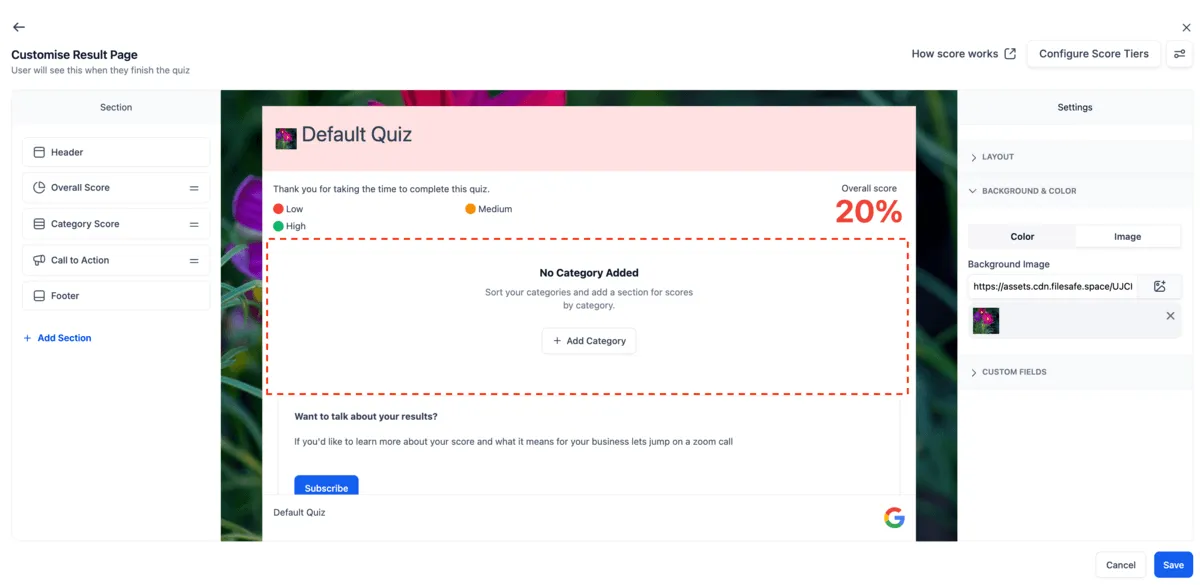
- Adjust the results page width to better fit your layout
- Add a background color or background image to the results page
- Select or add a section and have the preview automatically scroll to that section
- See a clearer empty state when no quiz categories have been created
- Use the “How Scoring Works” guidance while building results pages
- Edit quiz results pages with a smoother builder flow
How to Access
Open the Quiz Builder, then go to the Results Page or Edit Result Template area. From there, you can update styling, manage categories, and customize the layout and sections.
Why It Matters
These updates give you more control over how quiz results pages look and make it easier to build branded quiz experiences. The clearer empty state helps reduce confusion when categories are missing, and automatic preview scrolling makes longer results pages faster to edit.
In Case You Missed It
For another recent builder improvement, read AI Builder for Workflows Gets a Major Upgrade.
Need Help Applying This Update?
If you’d like help rolling this out in SMBcrm, visit Support or request a demo.
Explore this in SMBcrm
Give each submitted form a next step.
Explore forms, surveys, and lead capture. Decide which details to collect and who should review each submission.
Explore forms and lead captureAlready using this feature? Find setup help