The Association Created trigger lets you start automated workflows when a new association connects CRM records. Filter by the associated object and relationship label to control when follow-up begins.
Supported Records and Workflows
The trigger supports Contacts, Opportunities, Custom Objects, and Companies in SMBcrm CRM. It is available in standard workflows, Custom Object workflows, and Company workflows.
Use it to notify your team when a buyer is linked to a property, create a follow-up task when records are connected, or start an onboarding process.
How to Set It Up
- Enable Association Created Trigger in Labs.
- Go to Automation > Workflows and open a supported workflow.
- Add the Association Created trigger.
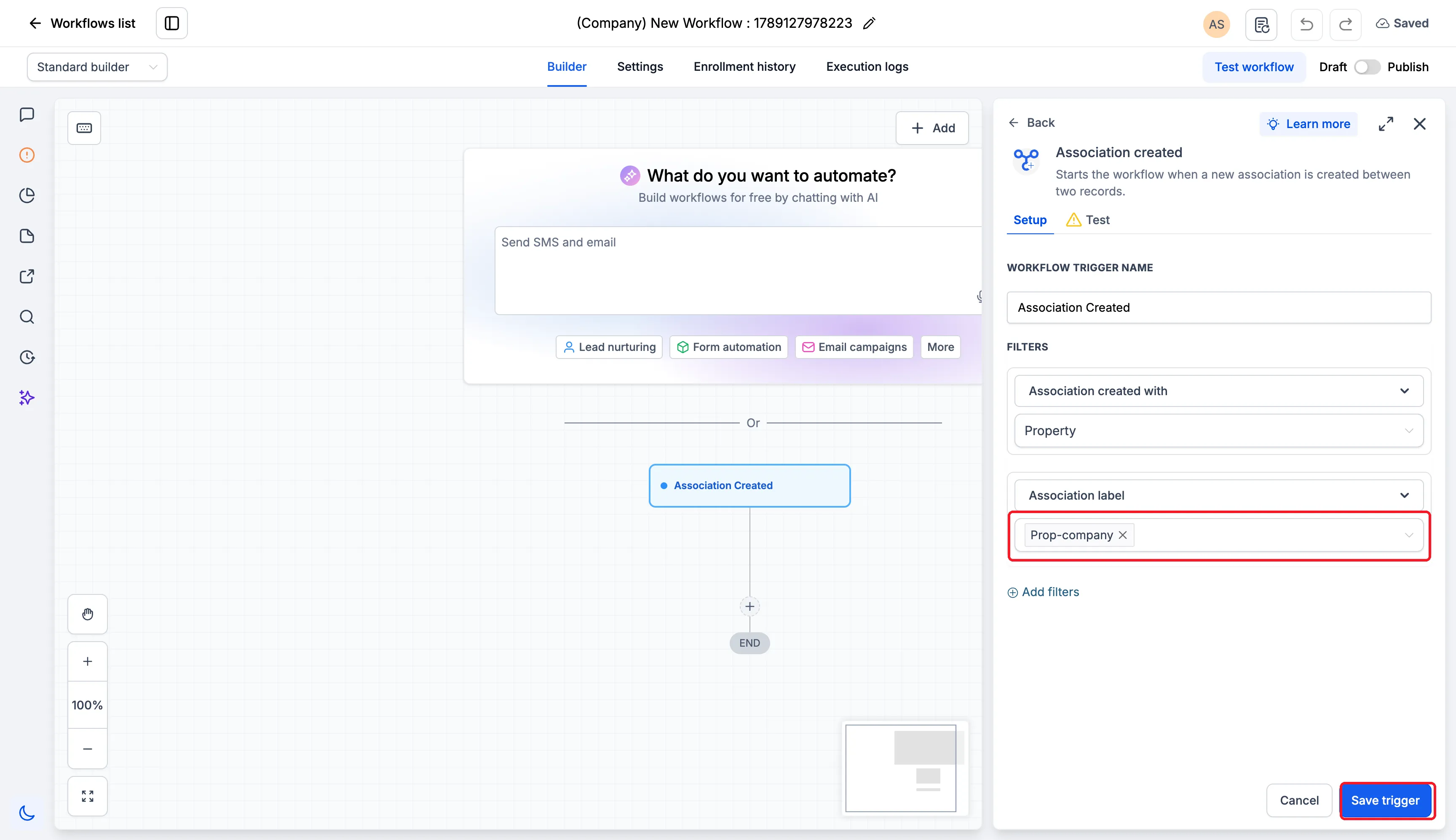
- Under Association created with, choose the associated object. Select Add filters to add an Association label filter and choose the label.
- Save the trigger, add your actions, and publish.
Choose the workflow type for the record that should enroll, then configure the associated object. Use relationship labels to target the role that matters to your process.
To test the setup, create a matching association after publishing, then check Enrollment history and Execution logs.
Release Images
Need Help Applying This Update?
Want help turning this update into a working part of your CRM, marketing, or automation setup?
Get Started or schedule a demo and we’ll help you map the right next step.