SMBcrm workflows now support an Add action type in the Update Contact Field action for multi-select fields. This lets you append selections to existing contact data instead of replacing what is already saved.
What changed
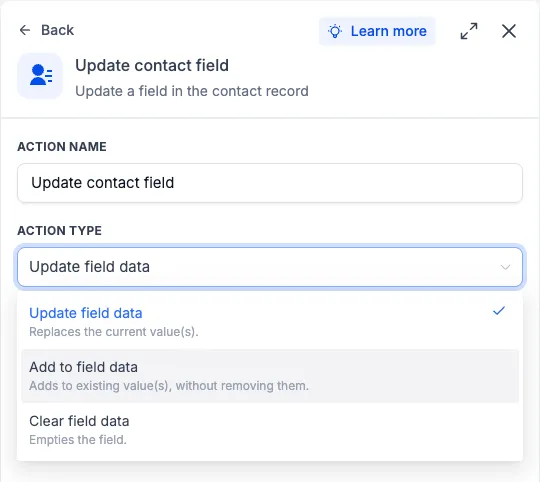
In SMBcrm automation, the Update Contact Field action now includes Add for multi-dropdown and multiple-checkbox fields. When Add is selected, the field picker only shows those supported multi-select field types.
This is useful when a workflow needs to add another selection to a contact profile while keeping the contact’s existing selections intact in your CRM contact records.
How to use it
- Add the Update Contact Field action to your workflow.
- Select Add as the action type.
- Choose a multi-dropdown or multiple-checkbox field.
- Select the value or values you want to add to the contact’s existing selections.
Example
If a contact selects “Email Marketing” on a form and that value is saved in a multiple-checkbox field called “Services Interested In,” a later workflow step can add “SMS Marketing” to the same field. The contact keeps “Email Marketing” and also gains “SMS Marketing.”
Field update options
- Update field data: replaces the current value or values.
- Add to field data: adds to existing values without removing them.
- Clear field data: empties the field.
Why it matters
Previously, updating a multi-select field replaced all saved selections. The Add option helps workflows build on existing contact data without accidentally removing information.
In Case You Missed It
For another automation update, read WhatsApp Analytics Added to Workflow AI Assistant.
Release Images
Need Help Applying This Update?
Want help turning this update into a working part of your CRM, marketing, or automation setup?
Get Started or schedule a demo and we’ll help you map the right next step.