SMBcrm Social Planner now supports Bluesky comment management, so you can view and reply to Bluesky comments alongside other social channels.
With this update, users can view and reply to comments on Bluesky posts directly from Social Planner without opening the native Bluesky platform.
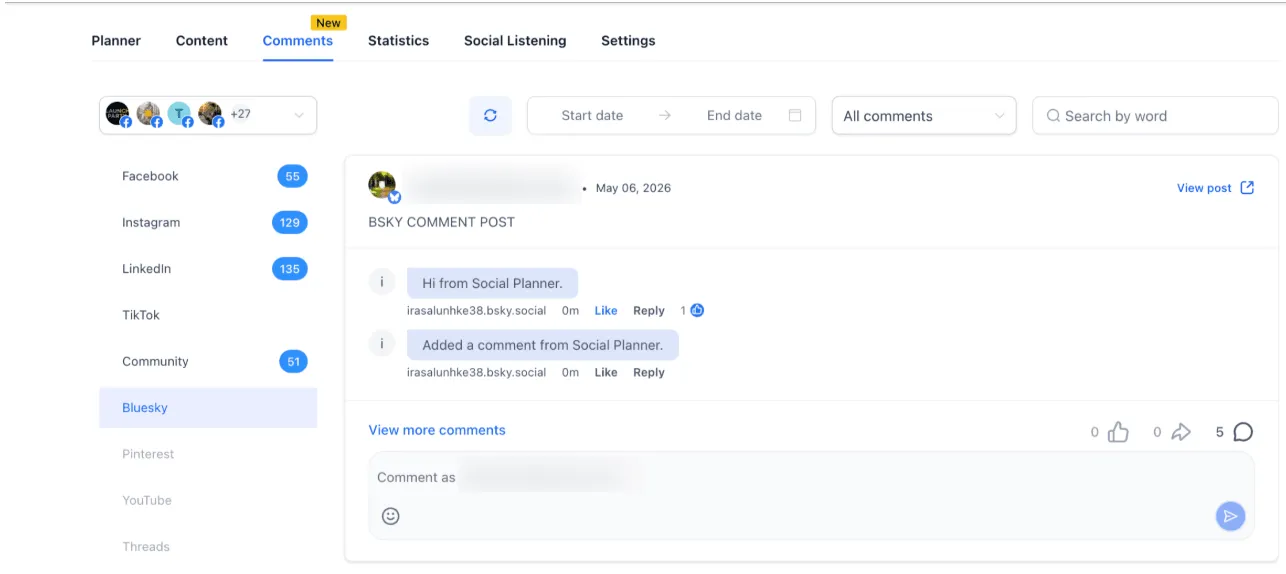
What Changed
- Reply to Bluesky comments directly from Social Planner
- Add emojis alongside text replies
- Follow conversation context with threaded replies up to 3 levels deep
- Automatically sync comments for recent Bluesky posts
How to Use It
- Go to Marketing > Social Planner > Comments.
- Open the Comments tab.
- Select your Bluesky account.
- View and reply to comments directly.
Why It Matters
This update helps teams manage Bluesky engagement without switching platforms. It also supports faster responses and more consistent communication across connected social channels.
Notes and Limits
- Replies have a 300-character limit.
- Only text and emojis are supported.
- Media attachments are not supported.
- Profile tagging is not supported.
- Replies are visible up to 3 levels deep.
- Full threads are stored internally.
- Comments sync for the last 15 posts only.
- Sync runs every 6 hours.
In Case You Missed It
You may also want to read about how Social Planner CSV uploads now support video thumbnails.
Need Help Applying This Update?
Want help turning this update into a working part of your CRM, marketing, or automation setup?
Get Started or schedule a demo and we’ll help you map the right next step.
Explore this in SMBcrm
Connect the publishing plan to the next conversation.
Explore scheduling and publishing tools. Review the channels, approvals, and replies your team needs to manage.
Explore social media toolsAlready using this feature? Find setup help