SMBcrm has improved the compliance check for chat widget registration. During campaign registration, SMBcrm now scans the user’s website to confirm that the chat widget is installed before allowing submission.
What Changed
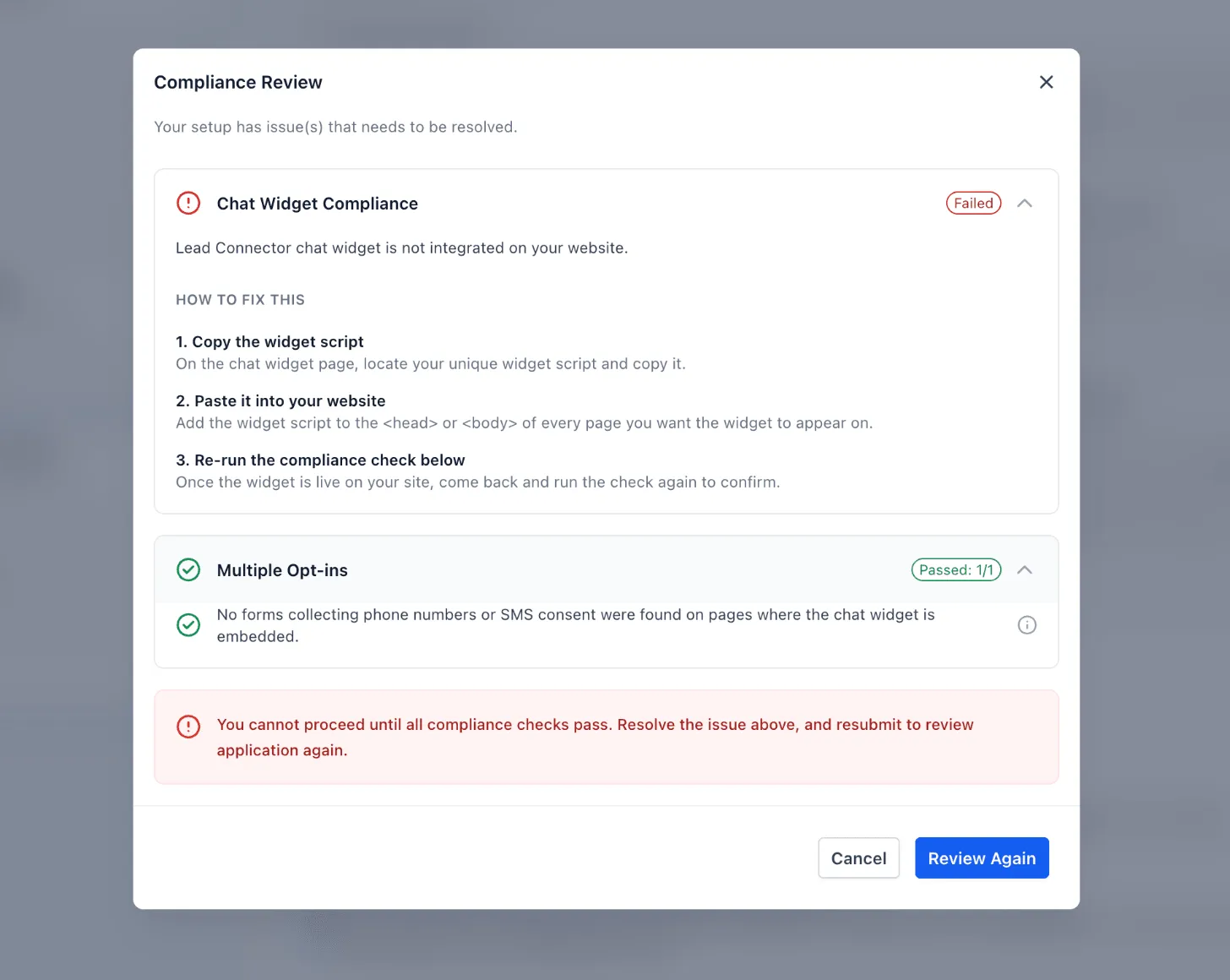
During Chat Widget registration, the Compliance Review modal now checks whether the SMBcrm chat widget is present on the website.
If the widget is not found, users see a clear prompt with steps to fix the issue:
- Copy the widget script.
- Paste it into the website.
- Run the check again.
Users can resubmit only after the check passes.
Why It Matters
Previously, users could submit Chat Widget campaigns even when the widget was not actually present on the website. Those submissions often led to rejections.
By catching missing-widget issues before submission, SMBcrm gives users a clearer path to fixing setup problems and moving campaigns through review faster. This update supports smoother customer communication workflows across SMBcrm communication tools.
In Case You Missed It
You may also want to read Visual Edits in AI Studio.
Need Help Applying This Update?
Want help turning this update into a working part of your CRM, marketing, or automation setup?
Get Started or schedule a demo and we’ll help you map the right next step.