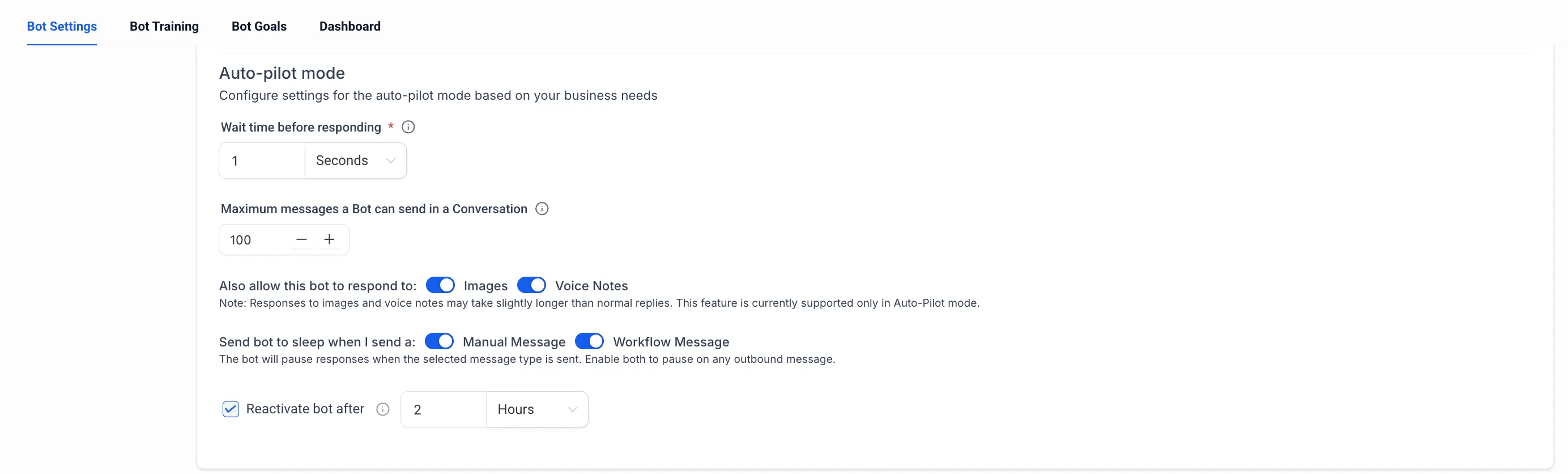
SMBcrm has added more granular controls for how Conversation AI pauses when outbound messages are sent. The previous bot sleep setting has been split into two independent options: manual messages and workflow messages.
This gives teams more precise control over communication and automation workflows without changing existing behavior by default.
What Changed
Users can now configure bot sleep behavior separately for:
- Manual messages sent directly by a user
- Workflow messages sent through automations
This makes it possible to pause the bot only for manual interactions, only for automated messages, or for both message types.
How It Works
Existing Behavior Stays the Same
If no changes are made, Conversation AI continues to follow the previously configured sleep behavior. Existing automations and manual interactions remain unaffected.
Separate Controls for Manual and Automated Messages
Teams can now choose whether manual replies, workflow messages, or both should send the bot to sleep. This helps support hybrid communication strategies where people and automations both participate in the same conversation.
Reactivation Still Works as Before
The existing “Reactivate bot after” setting continues to apply regardless of whether the bot was paused by a manual message or a workflow message.
Why It Matters
Separate bot sleep controls help prevent unnecessary pauses during automated workflows while still allowing manual interventions to pause Conversation AI when needed. The result is more predictable bot behavior and better continuity across mixed manual and automated conversations.
This is an enhancement to existing functionality. Current behavior remains unchanged unless users update the new settings.
In Case You Missed It
You may also want to review the recent update on Services Calendar Improvements for Booking, Pricing, and AI.
Need Help Applying This Update?
If you’d like help rolling this out in SMBcrm, visit Support or request a demo.