SMBcrm Forms and Surveys can now complete eligible $0 product orders without asking the customer for card details. This applies when the Sell Products element is used and the order total is confirmed as $0 with no recurring amount due.
For businesses using Forms and Surveys as part of their lead capture and payments and commerce workflows, this reduces unnecessary friction for free offers while keeping paid checkout behavior intact.
What changed
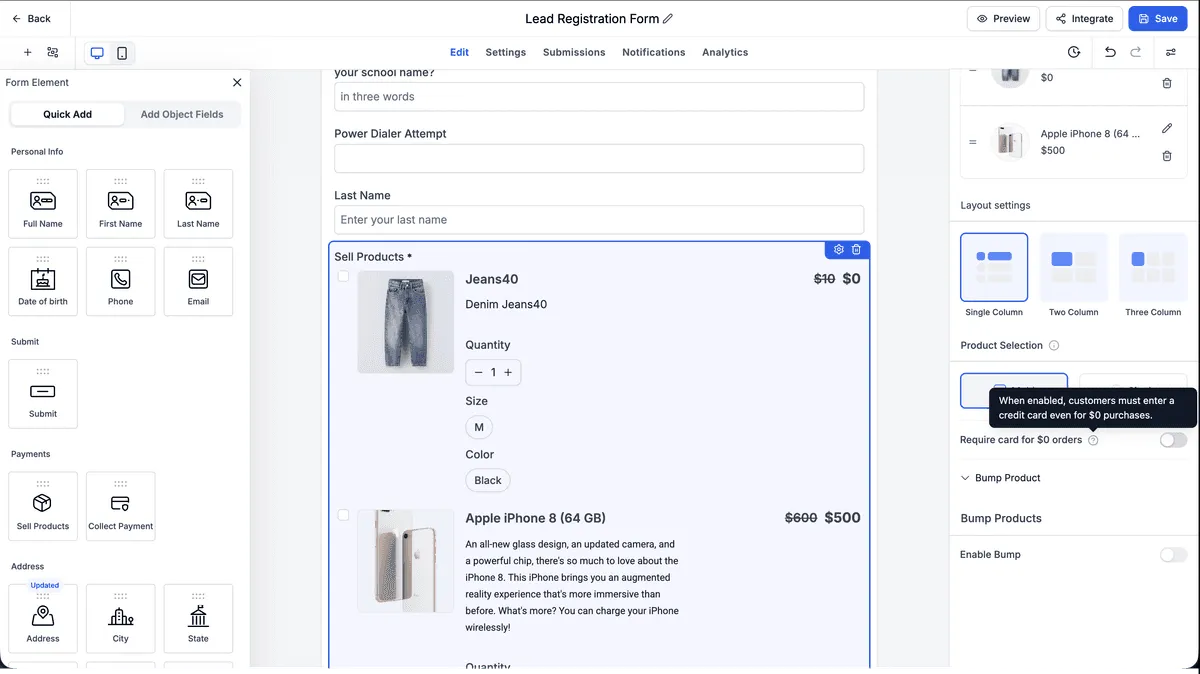
A Require card for $0 orders toggle is available on the Sell Products element in:
- Forms
- Surveys
When the toggle is turned off, payment fields are hidden automatically for product orders that total $0 and have nothing recurring due. The order still completes as a free checkout, and the submission and order history remain complete.
Key details
- Coupon-driven $0 totals are supported, including a 100% discount that brings the total to $0.
- Forms and Surveys embedded in a Funnel use the Funnel-level Require Credit Card setting instead of the element setting.
- Subscriptions, free trials, and any order with a recurring amount still require a card.
- If SMBcrm cannot confirm the total is $0, card collection remains visible and payment is collected as usual.
- Existing Forms and Surveys continue to work the same way unless the setting is changed.
- Desktop and mobile experiences are supported.
How it works
- Add or open a Sell Products element in a Form or Survey.
- Turn off Require card for $0 orders if you want eligible free orders to skip card entry.
- When the customer’s product selection totals $0 with nothing recurring due, SMBcrm hides the payment fields and completes the order without card entry.
- If the Form or Survey is embedded in a Funnel, the Funnel setting takes precedence.
- If the toggle remains on, card collection behaves as it did before.
Notes
The setting defaults to on, so existing Forms and Surveys are not changed automatically. Donation and custom-amount payment types are out of scope for this update and keep their existing behavior.
Card collection is never skipped when the total cannot be confirmed as $0. This includes cases where the pricing summary fails to load or when a customer submits while totals are still updating after a product, variant, coupon, or order bump change.
This release also improves related checkout behavior: the payment element no longer briefly appears and disappears on $0 orders, card details entered on paid orders are preserved when changing quantity or applying a coupon, and Surveys embedded in Funnels now receive Funnel context correctly.
In Case You Missed It
You may also want to review Bulk Custom Fields for Forms, Surveys, and Quizzes.
Release Images
Need Help Applying This Update?
Want help turning this update into a working part of your CRM, marketing, or automation setup?
Get Started or schedule a demo and we’ll help you map the right next step.