AI-Powered Field Tooltips in Workflows
Workflow action fields now include AI-powered tooltips that provide contextual explanations directly inside the builder.
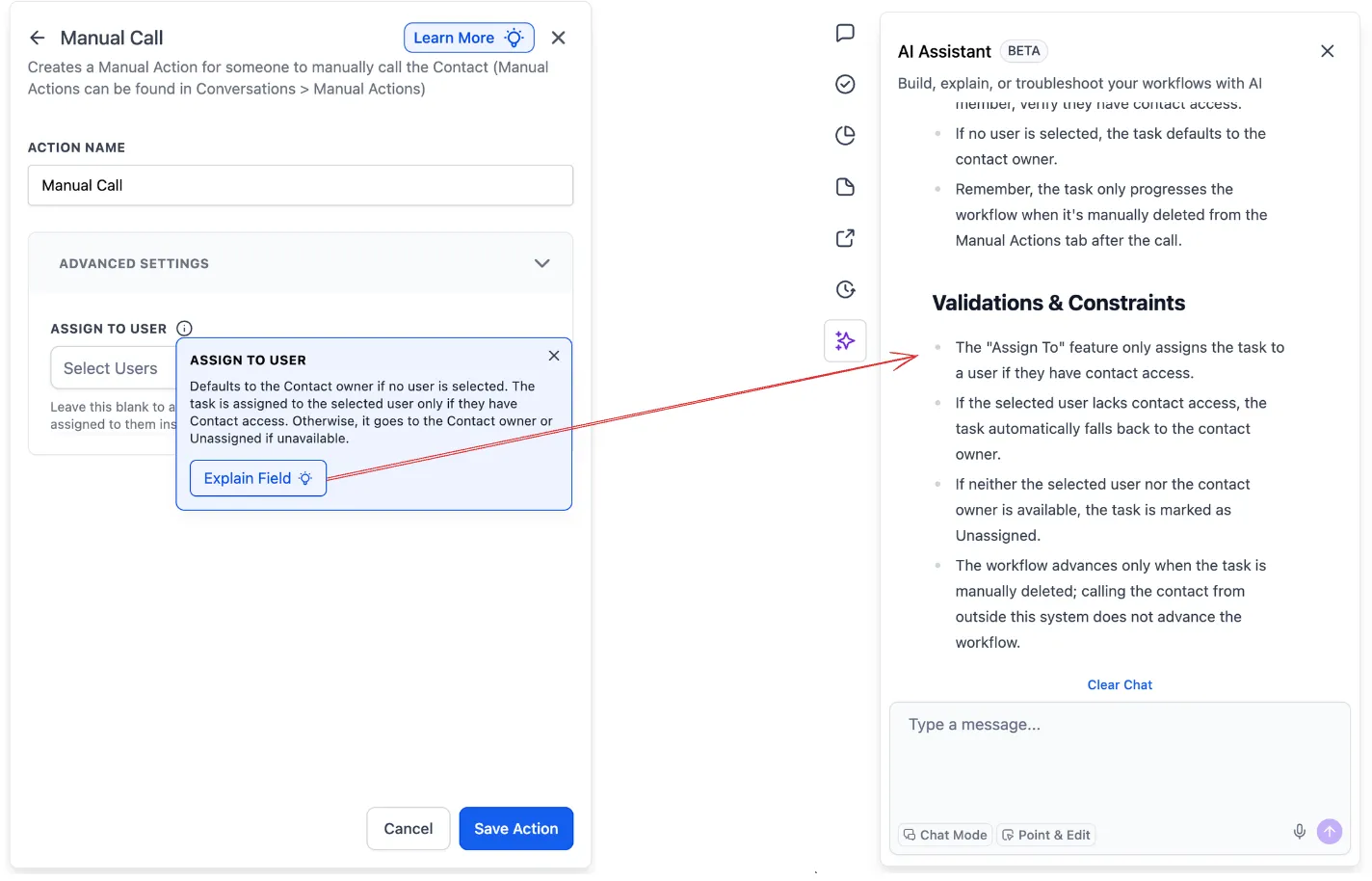
This builds on the existing AI “Learn More” guidance for actions and triggers by extending help to the individual field level. In supported fields, hovering over the info icon shows a short description of the field’s purpose along with an Explain option. Selecting Explain opens the AI assistant with a more detailed explanation of the field and how it affects the workflow.
Users can also ask follow-up questions without leaving the builder, making it easier to understand settings while working in automation workflows.
Current Availability
This feature is currently in experiment mode.
At this stage, it is live on two fields within Advanced Settings for the Manual Action to SMS and Manual Action to Call actions. Broader rollout will depend on the results of this test.
Why It Matters
Field-level AI guidance helps users understand settings in context instead of leaving the builder to search documentation or guess what a field does.
For teams building workflows, that can reduce confusion, speed up setup, and make the builder easier to use for newer users.
What Comes Next
Based on the experiment results, these AI-powered tooltips may expand to more fields across actions and triggers.
Need Help Applying This Update?
If you’d like help rolling this out in SMBcrm, visit Support or request a demo.