Trigger Descriptions in Workflow Builder
Workflow triggers now include built-in descriptions in the Workflow Builder. Users can see what each trigger does and when it runs while browsing, selecting, or editing triggers.
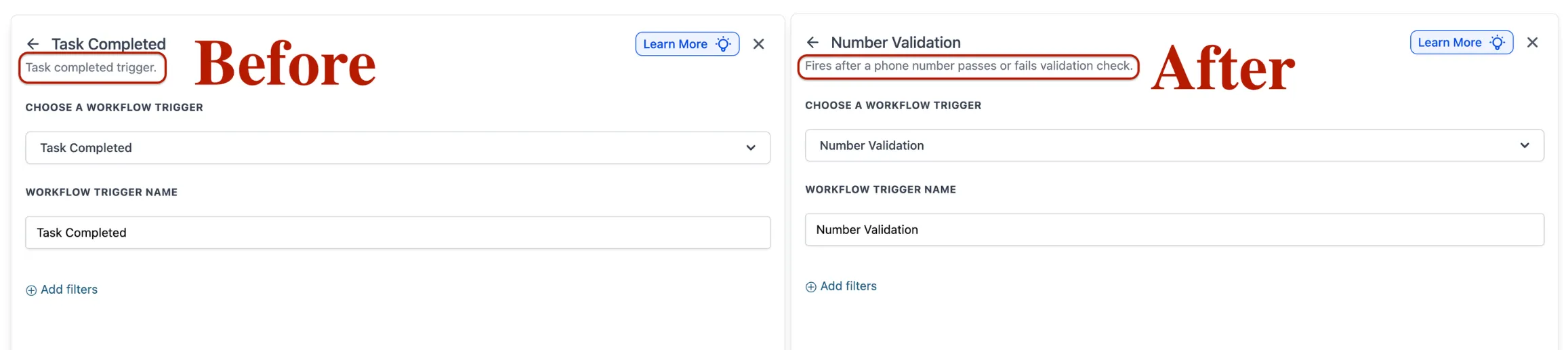
What Changed
Each trigger in the Workflow Builder now shows a human-readable description of its function and when it fires.
How It Works
Open the Workflow Builder and add or edit a trigger. Each available trigger now displays a clear description, so you can choose the right option without relying on external documentation.
For teams building automation workflows, this makes setup more straightforward and easier to review.
Why It Matters
Clear trigger descriptions reduce guesswork during workflow setup. This helps both new and experienced users identify the right trigger faster and build workflows more confidently.
Need Help Applying This Update?
If you’d like help rolling this out in SMBcrm, visit Support or request a demo.