AI Builder Now Clarifies Missing Details Before Creating Workflows
SMBcrm’s AI Builder now gathers missing context before generating or editing workflows. When a request is too vague, it asks a small set of focused questions first so the initial result is more accurate and requires fewer revisions.
This update improves the workflow creation experience for teams using Automation and AI features.
What’s Changed
Previously, vague prompts could lead the AI Builder to make assumptions. For example, a request like “follow up with the customer” might generate a full workflow that still needed several edits.
The same issue could happen when editing an existing workflow. If the instruction was too broad, the resulting changes might not match the user’s intent.
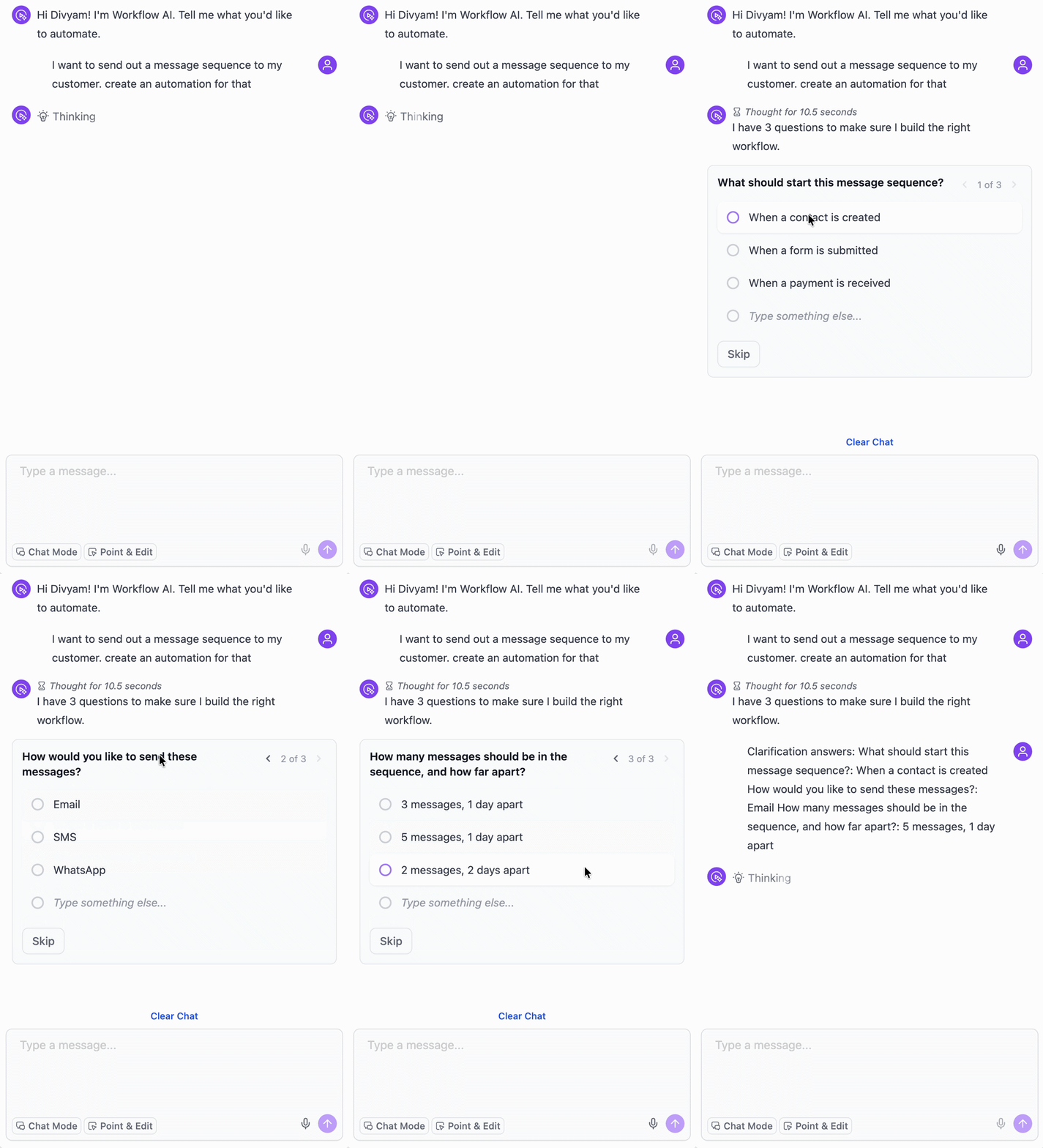
Now, the AI Builder can detect missing high-impact details and ask up to three focused questions before it generates or edits the workflow.
When the Clarifying Questions Appear
The AI Builder only steps in when important details are missing, such as:
- the workflow trigger is not specified
- the communication channel is not provided
- the timing of an action is not defined
- an unsupported channel is mentioned and a supported option is needed instead
How It Works
- Open the AI Builder and describe the workflow you want to create or edit.
- If important context is missing, the AI Builder asks targeted questions before continuing.
- Choose from the suggested options or enter your own response.
- Skip any question if you want the AI to decide for you.
- The workflow is then generated or updated using the added context.
Questions appear in a multiple-choice format. If more than one question is shown, you can move between them using navigation arrows. Every question can be skipped.
Why It Matters
AI-generated workflows are only as strong as the instructions behind them. By collecting the right details upfront, the AI Builder can deliver a better first output, reduce back-and-forth revisions, and help users get to a live workflow faster.
In Case You Missed It
You can also read about Appointment Triggers Now Support Appointment Guests.
Need Help Applying This Update?
If you’d like help rolling this out in SMBcrm, visit Support or request a demo.