Appointment Triggers Now Support Appointment Guests
Appointment-based workflow triggers can now enroll guests as well as the primary contact. This makes it easier to automate reminders, confirmations, and follow-ups for multi-participant appointments using Automation.
What Changed
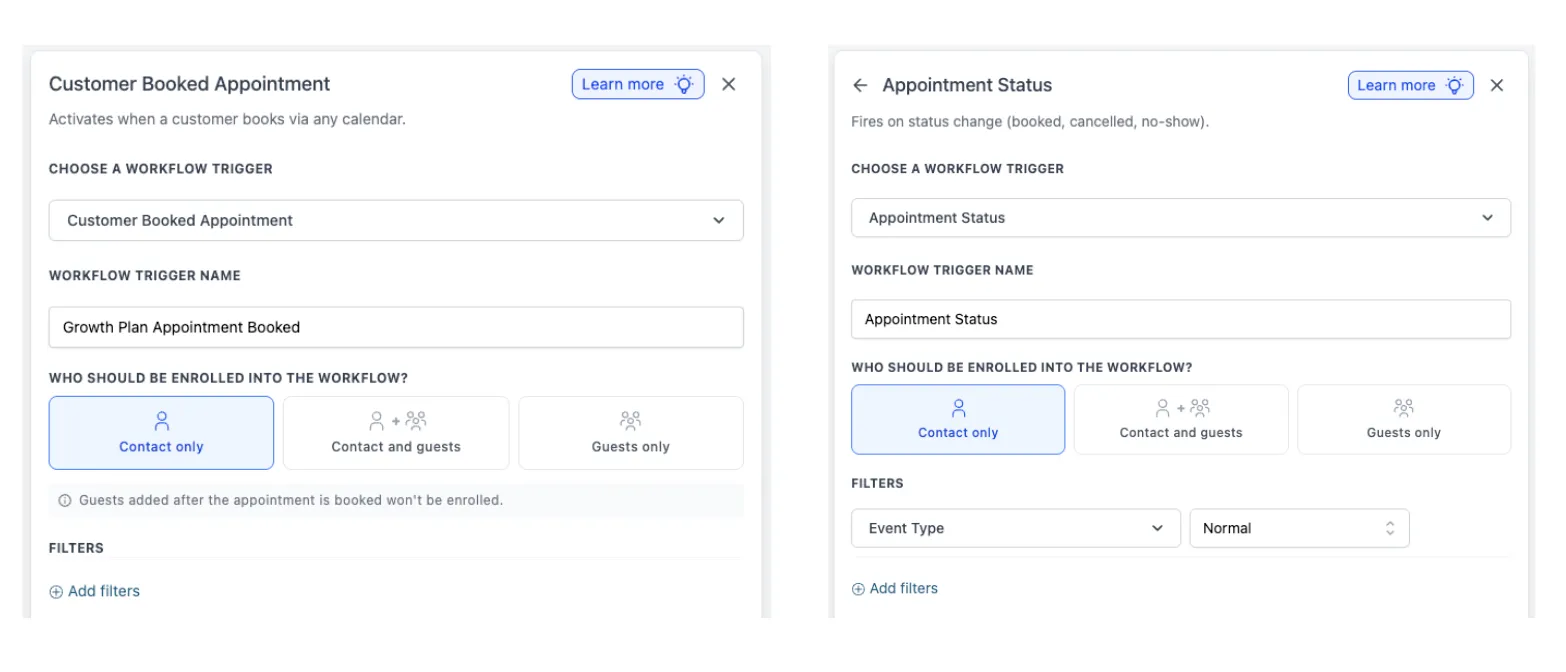
Both Customer Booked Appointment and Appointment Status triggers now support guest contacts.
When setting up the trigger, you can choose who gets enrolled:
- Contact only
- Contact and Guests
- Guests only
If you choose Contact and Guests, the workflow runs once for the primary contact and once for each guest attached to the appointment.
If you choose Guests only, the primary contact is not enrolled.
How It Works
When the trigger runs, SMBcrm checks who is attached to the appointment at that moment and enrolls records based on the option you selected.
For the Customer Booked Appointment trigger, guests added after the appointment is booked are not enrolled from that earlier trigger event.
How to Use It
- Add a Customer Booked Appointment or Appointment Status trigger to your workflow.
- In Who should be enrolled into the workflow? choose Contact only, Contact and Guests, or Guests only.
- Save the trigger and publish your workflow.
Important Notes
- This applies to Customer Booked Appointment and Appointment Status triggers.
- Existing trigger configurations are not affected.
- The default behavior remains Contact only for backward compatibility.
In Case You Missed It
You can also read about Date-Based Booking Windows for Services.
Need Help Applying This Update?
If you’d like help rolling this out in SMBcrm, visit Support or request a demo.