Date-Based Booking Windows for Services
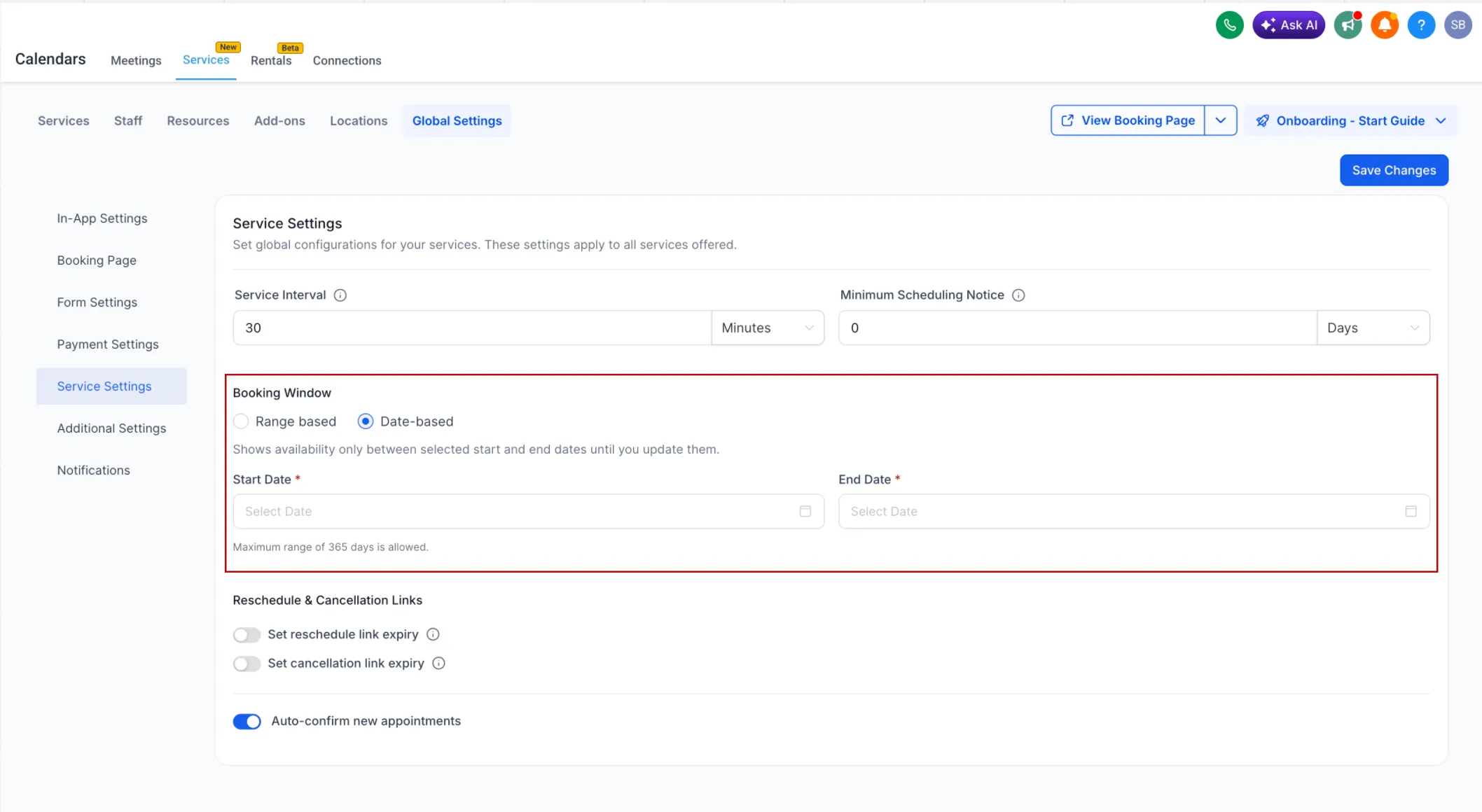
SMBcrm now supports date-based booking windows for Services. This gives you more control over when customers can book by letting you define a fixed availability range with specific start and end dates.
What Changed
You can now choose between two booking window options:
- Days-based: a rolling availability window that updates automatically
- Date-based: a fixed availability window with a defined start and end date
With the date-based option, only dates inside your selected range are bookable. The calendar will not automatically open future dates unless you update the range yourself.
How It Works
When you use Date-based booking windows:
- You set a specific start date and end date
- Only dates within that range can be booked
- If there is no availability configured inside the range, the calendar shows no available slots
- The date range must be valid and can be up to 365 days
How to Set It Up
- Go to Services → Global Settings → Service Settings
- Under Booking Window, choose Date-based
- Select your Start Date and End Date
- Save your changes
Why It Matters
This update is useful when you need tighter control over booking availability, including:
- seasonal schedules
- limited-time campaigns
- short-term service availability
- preventing bookings on future dates you have not configured
In Case You Missed It
You can also read about letting customers enter the service address during booking.
Need Help Applying This Update?
If you’d like help rolling this out in SMBcrm, visit Support or request a demo.