Brand Board Colors in the Forms and Surveys Color Picker
Saved Brand Board colors are now available directly in the color picker for forms, surveys, and quizzes. This makes it easier to keep designs consistent and apply saved colors without manually copying hex codes.
What Changed
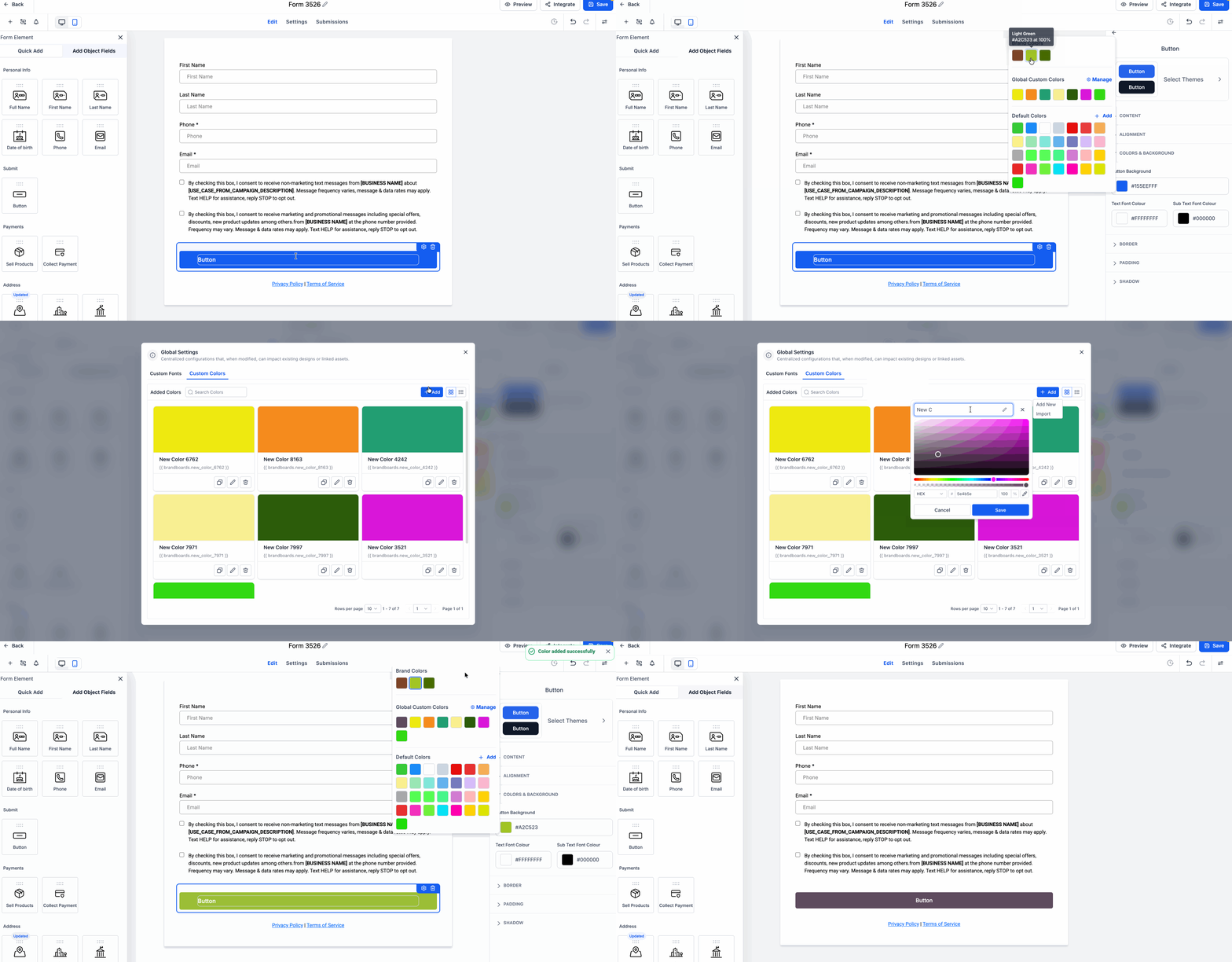
The color picker now includes:
- Brand Colors
- Default Colors
- Global Custom Colors
You can use saved brand colors while styling elements such as:
- Buttons
- Inputs
- Labels
- Shadows
Default Colors are shared across forms, surveys, and quizzes. A new manage option in Global Custom Colors opens Brand Settings so you can add or update custom colors more easily.
When you select a saved brand color, the builder shows the correct color preview automatically. Matching custom colors are also saved as brand-linked values to help maintain design consistency.
How to Access It
- Open the Form Builder and select any element with color settings, such as a button.
- In the style settings, click a color field like Button Background to open the color picker.
- Review the available sections for Brand Colors, Global Custom Colors, and Default Colors.
- To add a new custom brand color, click Manage from the color picker to open Brand Settings.
Why It Matters
This update reduces repetitive styling work and helps teams stay on-brand across lead capture assets. If you use SMBcrm for lead capture, saved brand colors can now be applied faster and more consistently across forms and surveys.
Example Use Cases
- Apply primary and secondary brand colors to buttons and form fields faster
- Keep styling more consistent across multiple team members
- Add a new custom brand color from the picker without manually re-entering color values
In Case You Missed It
You can also read about the Media Picker Integration for Forms, Surveys, and Quizzes.
Need Help Applying This Update?
If you’d like help rolling this out in SMBcrm, visit Support or request a demo.