TikTok Comments Are Now Supported in Social Planner
You can now view and reply to TikTok comments directly in Social Planner. TikTok comments appear alongside other social interactions in Comment Management, making it easier to manage engagement from one place.
What Changed
TikTok comments are now supported in Comment Management inside Social Planner. This update allows teams to:
- View TikTok comments alongside comments from other platforms
- Reply directly from the unified inbox
- Manage engagement with faster, more centralized workflows
- Use threaded replies with up to 1 level of nesting
This improves social response workflows and keeps conversations organized inside SMBcrm’s Communication tools.
Why It Matters
Managing TikTok engagement from the same workspace as your other social activity can help your team:
- Respond faster to incoming comments
- Reduce tool switching
- Keep brand responses more consistent
- Coordinate social engagement more efficiently
How It Works
Go to Marketing → Social Planner → Comment Management and open the Comments tab.
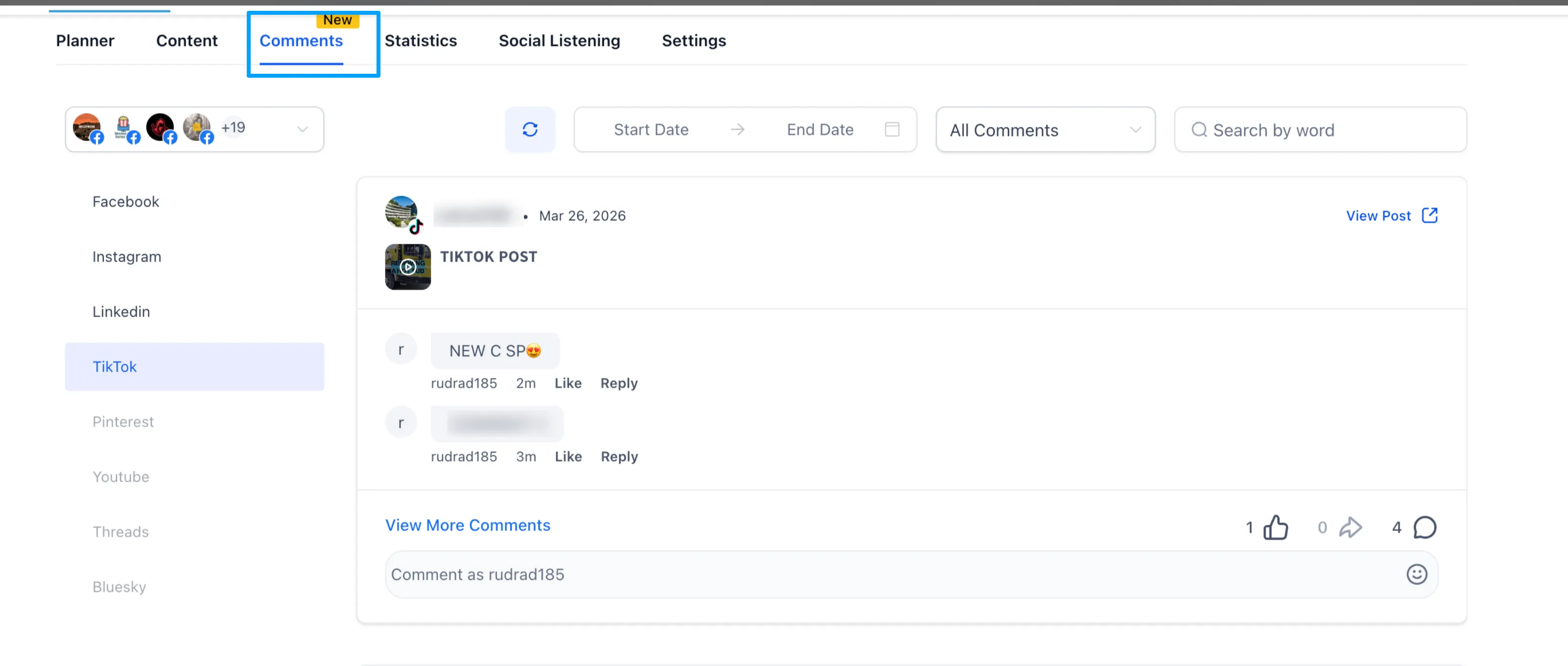
From there, you can view TikTok comments alongside other supported platforms and reply from the same inbox.
Notes
- Supported for TikTok Business Profiles only
- Maximum comment length is 150 characters
- Media attachments in replies are not supported
- Only 1 level of threaded replies is supported
- Additional TikTok capabilities may be added over time
In Case You Missed It
You can also read about the Conversations SLA Performance Dashboard.
Need Help Applying This Update?
If you’d like help rolling this out in SMBcrm, visit Support or request a demo.